How Disney's Disability Access Service (DAS) works, and how Mickey Alerts fits around it
Disney's Disability Access Service, or DAS, lets eligible guests request a return time and wait outside a conventional queue. When that time comes, you return to ride through the Lightning Lane entrance. Disney runs DAS and decides who is eligible. We explain the rules at Walt Disney World and Disneyland, checked on the date at the top of this page. We also cover how our free park planner, Fast Forward, dining and hotel alerts, app and Plaidy can help with the rest of your day. We do not register you for DAS or manage your DAS return times. You handle those with Disney.
Checked November 2026 against Disney's published rules and the product as it runs. Companion articles: How Lightning Lane works at Disney World and Disneyland, How Lightning Lane Fast Forward works and How the Disney park planner works.
What DAS is, and what it is not
Disney offers DAS for guests who, due to a developmental disability such as autism or similar, are unable to wait in a conventional queue for an extended period of time. Instead of standing in the standby line, your party asks for a return time for one attraction. When that time comes, you go to the attraction's Lightning Lane entrance and ride.
DAS is not a skip-the-line pass. It does not provide immediate access to experiences. Your return time is comparable to the current standby wait. If the standby wait is 60 minutes, your return time will be about an hour away. You can use that hour for a show, a snack, a rest in a quiet corner or break area, or another ride.
- It is free. There is no charge to register for DAS or to use it.
- It is separate from Lightning Lane. You do not need Lightning Lane Multi Pass, Single Pass or Premier Pass to use DAS, and holding a DAS return time does not stop you from using Lightning Lane too. More on that below.
- It covers the registered guest and their party. Up to four people in total ride together on each return time, and the registered guest must be one of them.
- It lives in Disney’s app. You request, change and cancel return times in My Disney Experience at Walt Disney World, or in the Disneyland app at Disneyland Resort.
Who DAS is for
Disney does not publish a list of qualifying diagnoses. Its criteria focus on being unable to wait in a conventional queue for an extended period due to a developmental disability such as autism or similar. You discuss your needs with a Cast Member. If DAS is not the right fit, they discuss other Disney services with you.
Using a wheelchair or ECV alone does not qualify a guest for DAS. Nearly every queue at both resorts is accessible to wheelchairs and ECVs. Disney directs you to those queues or, at the few attractions without one, to an attraction return time. Ask at the attraction or at Guest Relations.
You do not send medical records to Disney, and no note from a doctor is required. The guest who needs DAS must be on camera for the conversation. A parent or guardian registers for a child.
How to register: the video chat
To register, open the Disability Access Service page on Disney’s website and join a live video chat with a Cast Member. You can do this as soon as 60 days before your park visit. Allow time to wait for the chat. Registering from home can spare you that wait on your park day.
- Sign in to the Walt Disney World or Disneyland website with the Disney account that holds your tickets. Every member of your party needs valid theme park admission linked to that account before you start.
- Open Disney’s Disability Access Service page and read and accept its terms. Then press Request Live Video Chat. You need a device with a working camera and microphone.
- Wait for a Cast Member. The guest who needs DAS must be present on the call, and the person requesting it must be 18 or older.
- Explain your needs to the Cast Member. If they approve DAS, they complete the registration and take a photo of the registered guest. Cast Members check that photo at the attraction when you ride.
| Detail | Walt Disney World | Disneyland Resort |
|---|---|---|
| Opens | 60 days before your park visit | 60 days before your park visit |
| Chat hours | 7:00 AM to 8:00 PM Eastern | 8:00 AM to 8:00 PM Pacific |
| In person | No in-person registration. Guests who did not register ahead join a live video chat on the day of the visit. | Also available on site at the Accessibility Services Kiosk. |
| Language | English only. Text chat is available for guests with hearing disabilities, and the chat works with screen readers. | English only. An American Sign Language interpreter is available, and the chat works with screen readers. |
| App for return times | My Disney Experience app | Disneyland app |
Party size, and how long DAS lasts
- Four people. A DAS registration covers the registered guest and up to three more, four in total. If your family is larger, raise it in the video chat; the Cast Member decides what the registration covers.
- The length of your ticket, up to one year. DAS is valid for the length of the ticket or up to one year, whichever is shorter. You need to register again when it expires or you need a new ticket.
- One resort at a time. A registration at Walt Disney World is not valid at Disneyland Resort, and a Disneyland registration is not valid at Walt Disney World. You need a separate conversation with a Cast Member at each resort.
- Tied to the tickets on the account. Because return times are issued to the tickets linked when you registered, keep everyone’s admission on the same Disney account for the whole trip.
Annual Passholders and Magic Key holders can keep a DAS registration for up to a year. For day-ticket guests, it lasts for the ticket. You do not book DAS return times before your trip, so changing your dates does not mean losing a return time. If your registration has expired by your new visit date, register again.
On the park day: return times
Return times are same-day only. There is nothing to book before your visit. Once you have entered the park, open the Disney app, tap the menu at the bottom of the screen, then tap DAS (at Disneyland, the Disability Access Service tile). Choose an attraction to request a return time comparable to its current standby wait. You can also request one from the attraction’s page in the app.
- One at a time. Your party can hold one active DAS return time. Ten minutes after you redeem it, you can request the next one, for the same attraction or a different one.
- No window to miss. A DAS return time is valid from the time shown until the park closes, or until that attraction closes for the day. You can arrive after the time shown, as long as the park and attraction are still open.
- Anyone in your party can request it. The registered guest must be present and ride when you redeem the return time. They tap in first, and the Cast Member checks the photo.
- Change or cancel freely. Return times can be booked, redeemed, changed or cancelled in the app during the day.
- You can also ask in person. Guest Relations, Guest Experience Team locations at Walt Disney World and the Accessibility Services Kiosk at Disneyland can give you return times.
What you do with the wait is up to you. Disney’s own suggestions are other rides, shows, parades, character greetings, a rest in a break area, something to eat or a shop. Later in this guide, we explain how our tools can help you plan meals, breaks and other stops around those waits.
DAS and Lightning Lane together
DAS and Lightning Lane use the same entrance, but their booking rules are different. With DAS, you request one return time at a time on the day, based on the standby wait. Lightning Lane Multi Pass is a separate purchase from Disney. It lets you book return windows, with its own rules about advance booking, parks, tiers and how many selections you can hold. You can use both on the same day: a Lightning Lane window for one ride while you wait for your DAS return time at another.
| Detail | DAS return time | Lightning Lane selection |
|---|---|---|
| Cost | Free, after registration | Multi Pass, Single Pass or Premier Pass, bought from Disney |
| When you book | In the park, on the day | Ahead of the day at Walt Disney World (7 days out for Disney hotel guests, 3 days out for everyone else); on entering the park at Disneyland |
| How many at once | One | Up to three Multi Pass picks ahead at Walt Disney World, then one more each time you use one |
| The time you get | Comparable to the standby wait now | An available return window; you can keep checking for an earlier one |
| Valid until | The park or attraction closes | About an hour from the start of the window |
| Party | Up to four, registered guest riding | Everyone covered by the pass you bought |
For the full Lightning Lane rules, including the tier system at Walt Disney World and how Disneyland differs, see how Lightning Lane works. We explain how Mickey Alerts books and improves your Lightning Lanes while you use DAS further down.
Other Disney services worth asking about
Disney has other services that may help your family. A Cast Member can discuss them during the video chat if DAS is not the right fit. Disney’s DAS pages do not explain all their details, so these are general descriptions. Ask Guest Relations or a Cast Member at the attraction how they work for your visit.
- Rider Switch. When someone in your party cannot or will not ride, one adult waits with them while the others ride, then they swap without waiting again. It works alongside DAS and Lightning Lane.
- Attraction Queue Re-entry. If a guest has to leave a standby line partway through, a Cast Member can arrange for them to rejoin their party at the merge point rather than start over. It is for leaving a line you have already joined, not a return-time system.
- Accessible queues and attraction return times. Guests using a wheelchair or ECV use the standard queue at most attractions. Where a queue is not accessible, the attraction itself gives a return time.
- Break areas and quiet spaces. Each park has first aid and quieter indoor spots; the Guest Experience Team, under the blue umbrellas at Walt Disney World, can point you to them.
Where Mickey Alerts comes in
You manage your DAS return times in Disney’s app. While you wait to ride, you might need a meal, a break or something else to do. We can help you plan those parts of the day and manage your Lightning Lanes, dining and hotel alerts.
- The [park planner](#plan-the-day) includes breaks, chooses the quietest park days and takes each traveller’s comfort and limits into account. It is free for everyone.
- [Fast Forward](#fast-forward) books and improves your Lightning Lanes automatically while you manage DAS in Disney’s app.
- [Dining alerts and auto-book](#dining) watch for a table at your chosen time and can book a matching opening. You can plan that meal as a break.
- [Hotel alerts](#hotel) watch for openings at a resort that suits your family, including accessible rooms.
- [Crowd and wait-time data](#crowds-and-waits) help you choose days and hours with shorter waits.
- [The app](#in-the-park) sends a push notification for every alert. [Plaidy](#plaidy) answers questions along the way, including questions about DAS.
Plan a DAS day with the park planner
The park planner is free and works on the website without signing in. Start with these three settings to plan around your family’s needs.
- Trip style. Choose Easygoing for a later start, fewer stops and longer gaps, and say yes to a midday resort break. Each day is then built with that break in it, and shows and meals fill the gaps where queues would have been.
- Comfort and limits. Under Priorities, open Travellers and preferences and set each person’s limits: Needs breaks, Motion sensitive, No dark rides, No big drops, No spinning, No water rides. Mobility can be set to Limited walking, Wheelchair or ECV, and the planner slows its walking pace to match and keeps the stops closer together.
- Must, Want and Skip. Mark the handful of rides that matter most as Must. The planner puts them first in the day and places your parks on the lightest days we measure. Keep your Must list focused on the rides your family cares about most.
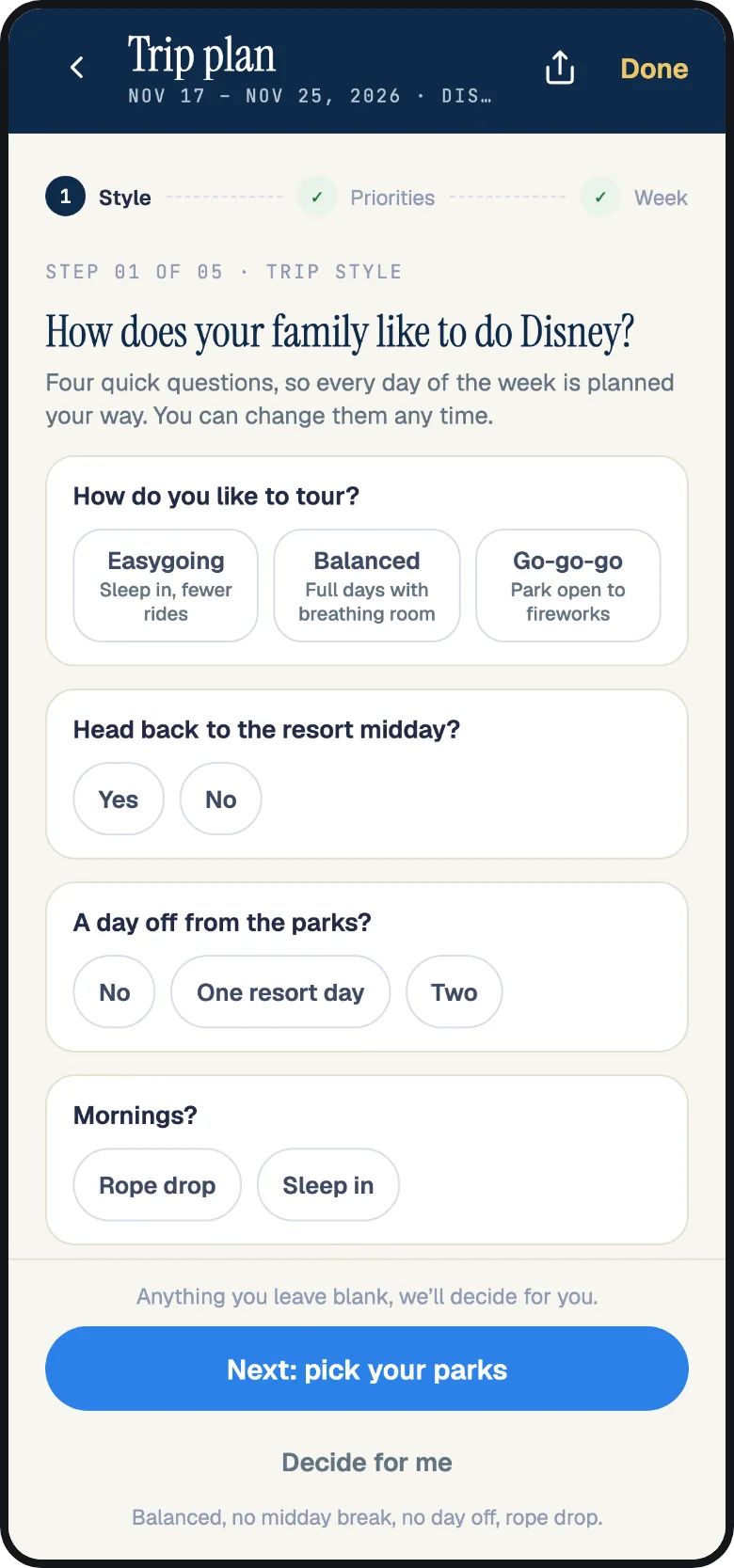
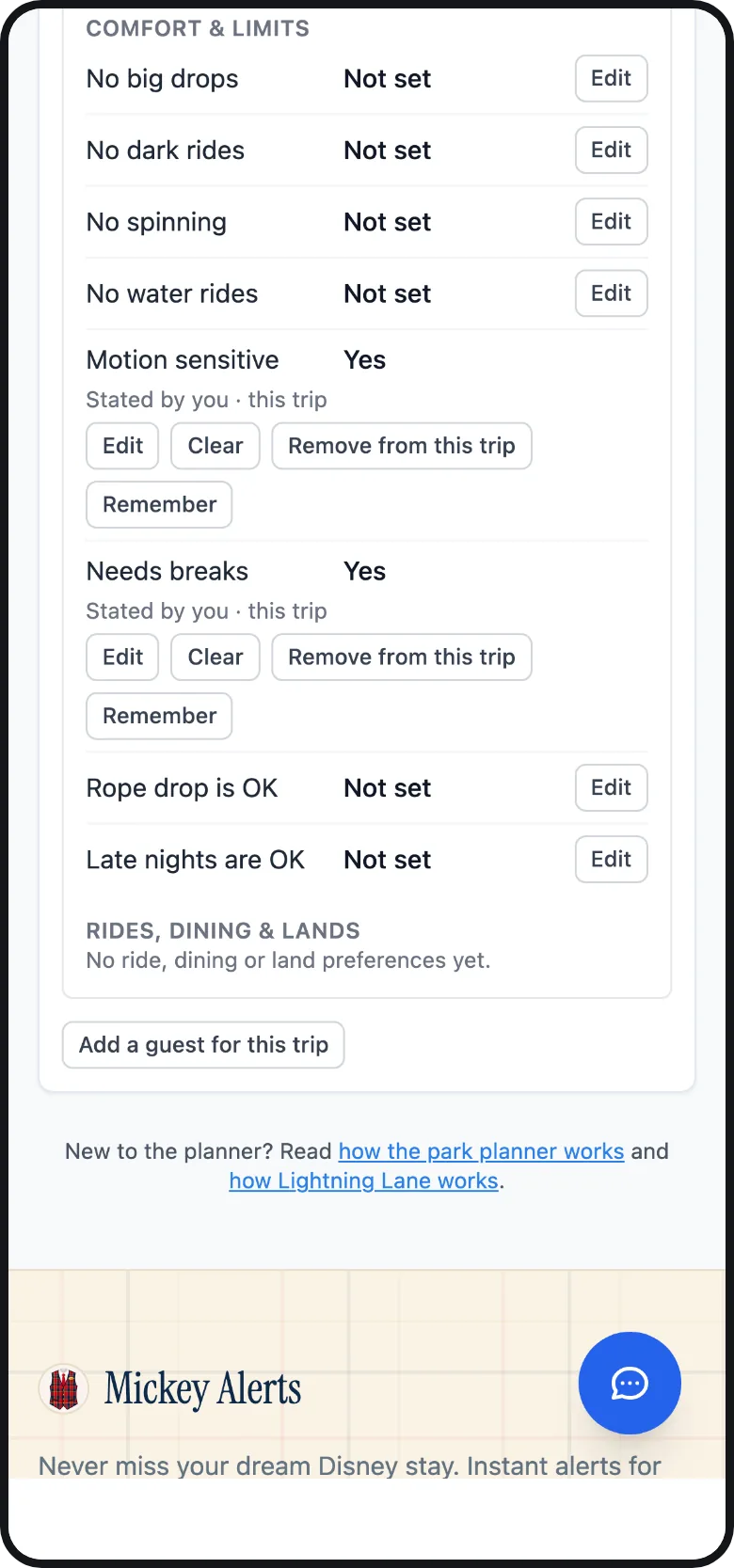
The planner does not know about your DAS return times. It plans each ride at the standby wait it expects, so with DAS you will often be ahead of the schedule. Use the app’s catch-up sheet to mark what you have done. Reflow my day then rebuilds the remaining plan from that point. Ask Plaidy for a slower pace, a later start or an earlier finish and it revises the day for you to confirm.
Fast Forward: Lightning Lanes while you use DAS
If you have Lightning Lane Multi Pass, Fast Forward manages its bookings for you. It books the rides you pick the moment Disney allows, at 7:00 AM Eastern when your Walt Disney World window opens or as you scan into the park at Disneyland. It keeps checking Disney for earlier return times and takes one when it appears. On your park day, it books the next ride on your list within seconds of you tapping into one.
You can wait for a DAS return time at one attraction while Fast Forward holds and improves a Lightning Lane for another. Check your DAS return time in Disney’s app. We send Lightning Lane updates by text or push notification.
- Your whole party moves together. A Lightning Lane change applies to everyone on the booking, unless you split it on purpose.
- You keep your current time until the earlier one is confirmed. Fast Forward confirms the earlier time before releasing your current booking.
- Your plans stay clear. Fast Forward skips return windows that overlap a dining reservation, a show or another booking on your Disney account.
- DAS return times are yours. Fast Forward reads and changes Lightning Lane selections only. It does not treat a DAS return time as a booking it can see, request or move. Plan your DAS requests around the Lightning Lane windows it texts you.
Dining alerts and auto-book: meals as breaks
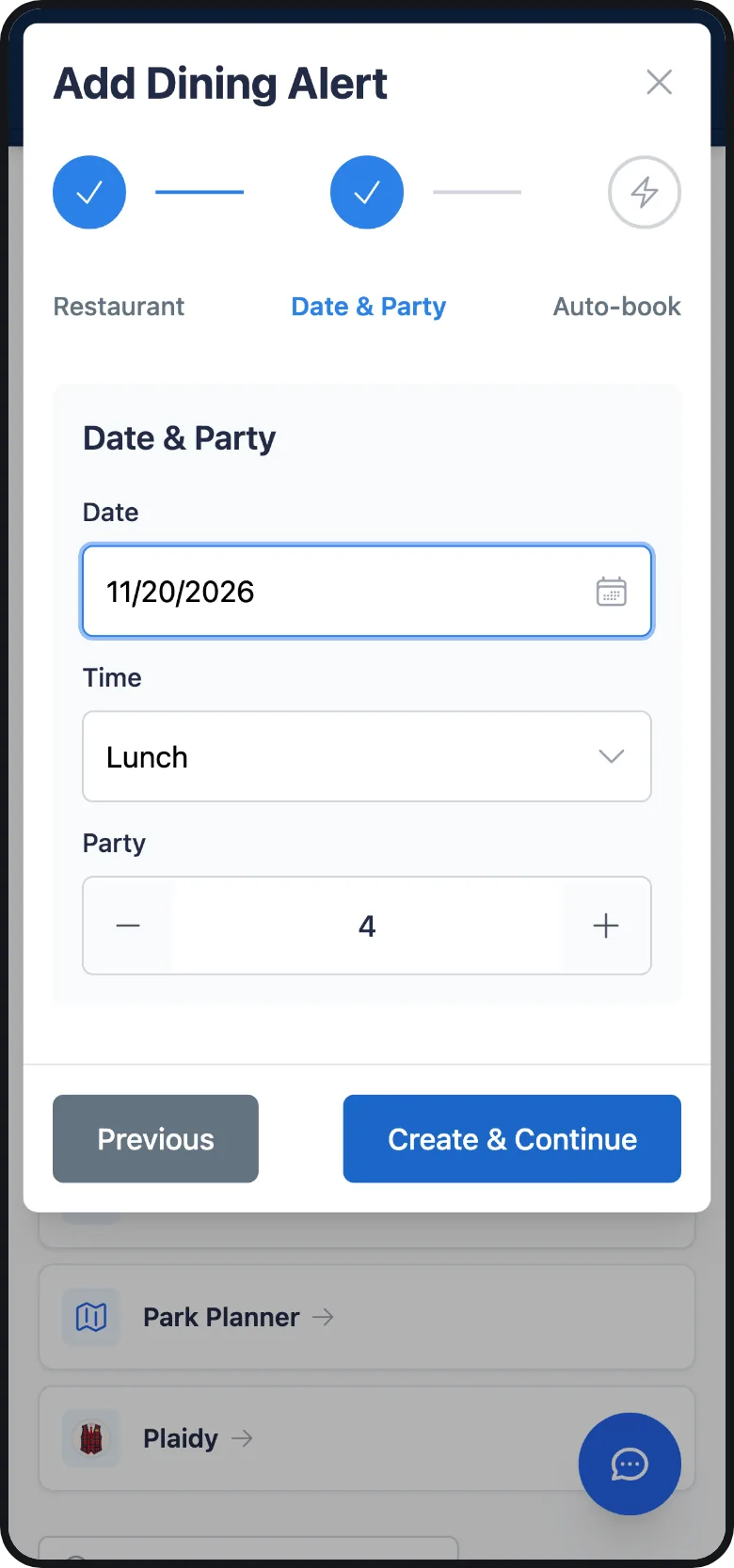
A table-service meal can give your family time to sit and rest. Dining reservations at both resorts open 60 days ahead and the popular ones go fast, so a dining alert watches the restaurant, date, party size and time window you choose and texts you the moment a table opens. You book it with Disney from the text.
Choose a meal window that fits the break you need. Lunch works for a midday stop, or you can choose a specific time between return times. A table at 1:30 PM might give your family a welcome rest before the afternoon.
- Auto-book, part of The Club, books the matching table on your own Disney account the moment one appears, including the instant Disney opens your date. You confirm Set up auto-book once; the reservation lands in My Disney Experience like any other.
- Experience alerts cover dessert parties, dinner shows and card-held experiences such as Bibbidi Bobbidi Boutique, with alerts by text and the same auto-book for card-held experiences.
- The planner keeps the meal where it is. The planner imports a reservation from your Disney account as a locked stop and places rides around it.
Hotel alerts: accessible rooms and the right resort
Think about the trip back to your hotel when planning a midday break. A resort on the monorail or a short walk from a park can make that easier. A long bus ride each way leaves less time to rest. Hotel alerts watch the resort, dates and room type you want and text you when a room opens at the rate you chose, standard or an offer such as Passholder, Florida Resident or Military.
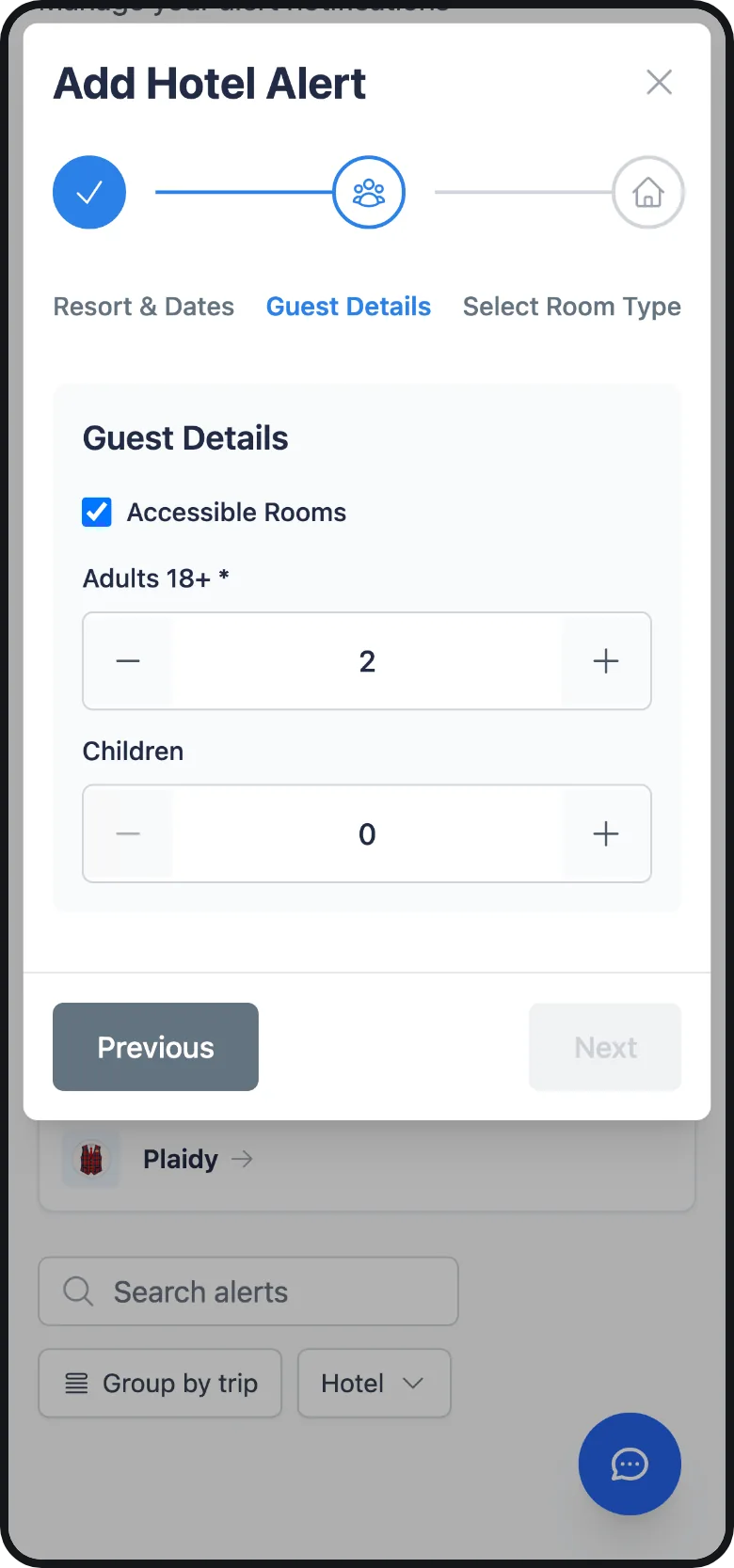
- Accessible rooms. Tick Accessible Rooms on the Guest Details step of the hotel alert on the website, or turn on Accessible rooms only under Who in the app. The room list then shows the accessible versions, marked Accessible, and the alert watches only those.
- Keep watching. A hotel alert stops after its first match unless you turn on Keep watching after a match, which texts you again when availability comes back after going away. This can help if you are waiting for a specific room type.
- DVC points. Members can set a DVC points alert for the villa resorts and let it keep watching for the stay, including partial stays if you ask for them.
Hotel alerts notify you of openings. You book the room with Disney yourself. Set an alert as soon as you know your dates, and set more than one if several resorts would work.
Pick lighter days and quieter hours
DAS return times are based on standby waits, so choosing a quieter day can help. The crowd calendar rates every day at every park from the waits we measure, to help you choose days with shorter lines. The planner does this for you when you let it place your priorities.
- Live wait times. The wait times pages show every ride’s current and typical standby wait, measured every few minutes. The typical pattern by hour tells you when a ride is likely to give the shortest DAS return time.
- Park hours. Park hours lists each day’s standard, early-entry and extended-hours windows, so you can plan around opening and closing, when waits are usually shorter.
- Rope drop. The rope drop guides explain the first hour at each park, when lines are often shorter.
In the park with the app
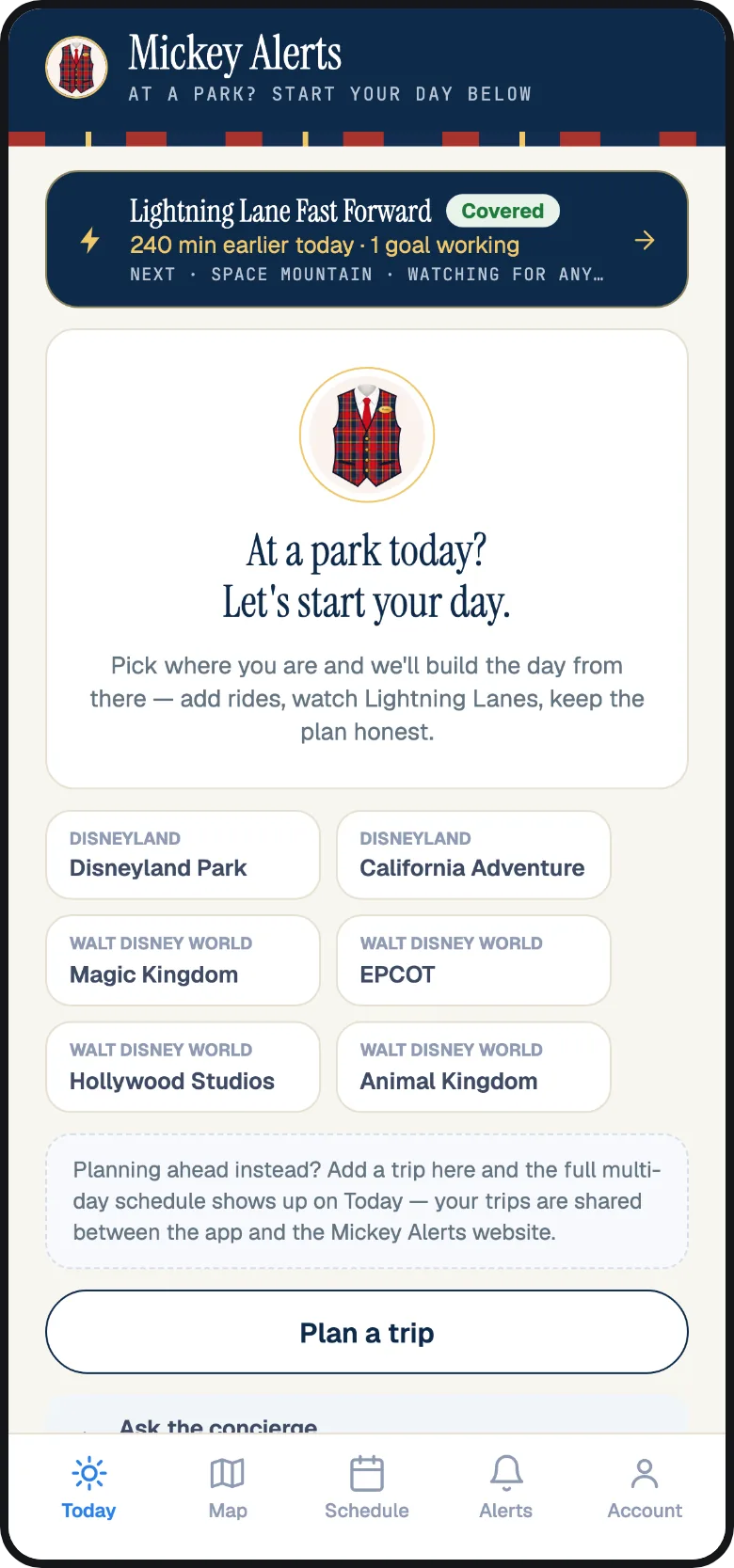
The Mickey Alerts app for iPhone and Android signs in with the same phone number as the website. Its tabs are Today, Map, Schedule, Alerts and Account. Use Disney’s app for DAS return times and ours for your plan and alerts.
- Schedule shows the day’s stops, checks them against live waits, and tells you what to do next. The catch-up sheet and Reflow my day update the plan when using DAS puts you ahead of schedule.
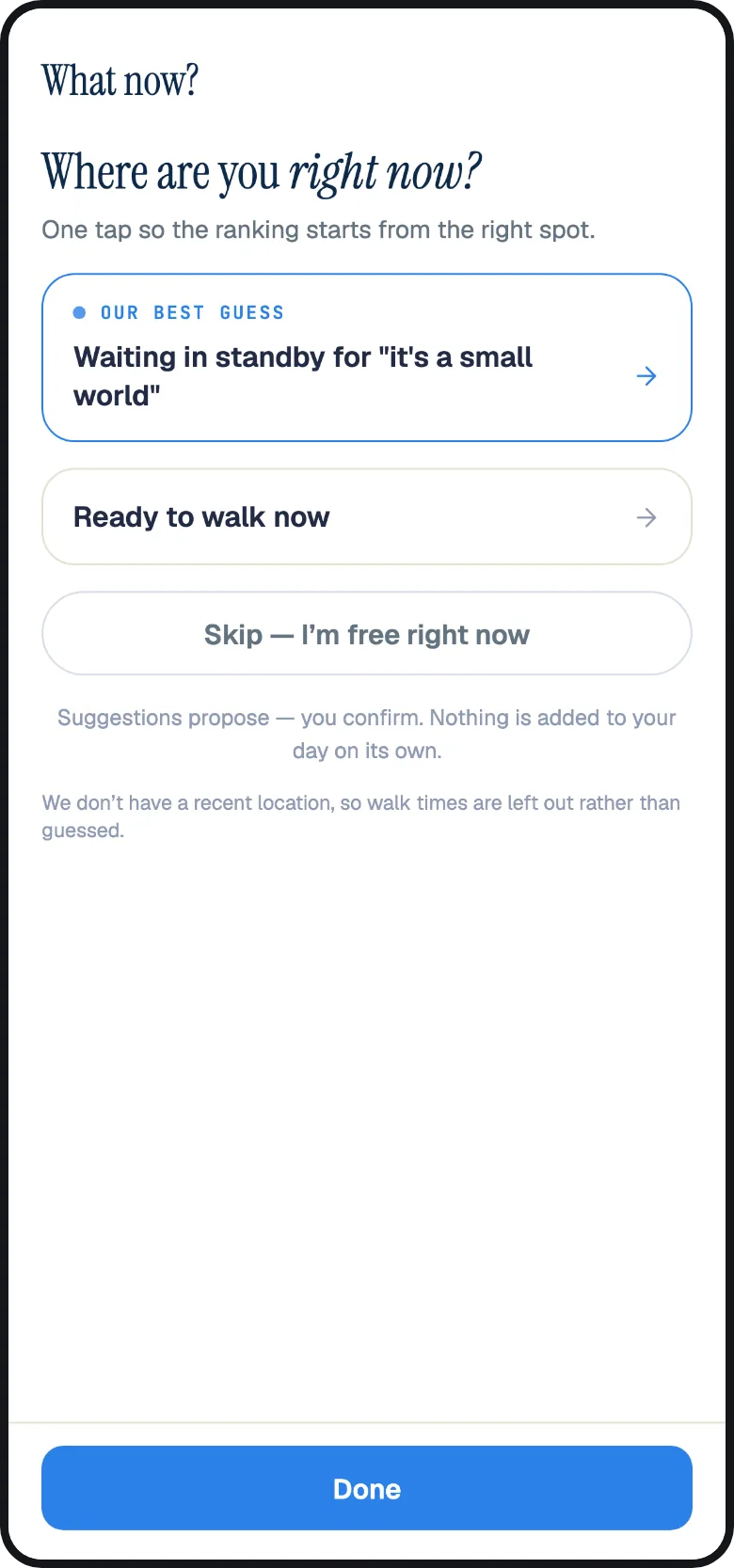
- What now? ranks suggestions using live data: a nearby ride with a short line, a break before a meal, or a Lightning Lane that is ready.
- Alerts sends every text alert as a push notification to every phone signed in to your account. The push often arrives first. You can set Quiet hours under Account.
- Fast Forward sits on the Today tab with every Lightning Lane it holds and what it is doing next.
Ask Plaidy
Plaidy is the Mickey Alerts assistant in the chat on the website and in the app. It uses this guide and our other three guides to answer questions. You can ask about the video chat, DAS party size or how Fast Forward manages Lightning Lanes while you use DAS. Its answer links to the section it came from. Plaidy cannot decide whether you qualify for DAS. Only Disney can do that.
You can also ask Plaidy to check hotel rates, open dining times or DVC availability live. These lookups are free, and you do not need to sign in. It can create, pause and edit your hotel, dining and DVC alerts from the chat, and revise a day in your plan for you to confirm. For help from our team, choose Talk to a person beside the chat. That opens the support chat we read.
If a travel advisor plans your trip
Travel advisors who plan with Mickey Alerts Advisor Studio ask about DAS on their intake form, under Accessibility, so your advisor knows from the start that someone in your party uses it. Your advisor can set up the hotel and dining alerts, build the plan and arm Fast Forward on your behalf. You still register for DAS and request its return times directly with Disney, using your own Disney account.
Your checklist, from 60 days out to the park
- As soon as you have dates: create the trip in the park planner, set Trip style to Easygoing with a midday break, and set each traveller’s comfort and limits. Set hotel alerts for the resorts that would work, with Accessible Rooms if you need one.
- 60 days out: link everyone’s tickets to one Disney account, then register for DAS on the video chat from Disney’s Disability Access Service page. Your dining dates open that morning too. If you set up dining alerts and auto-book beforehand, they will already be watching.
- 7 days out (Disney hotel guests) or 3 days out: Lightning Lane Multi Pass booking opens at Walt Disney World at 7:00 AM Eastern. Fast Forward books your picks at that moment if you armed it. Disneyland books on park entry.
- The night before: check park hours and your plan in the app. Check Disney’s app too, to make sure the DAS registration appears for the registered guest.
- In the park: request the first DAS return time as soon as you are through the gates. Let Fast Forward run the Lightning Lanes. Follow the Schedule tab and use Reflow my day if using DAS puts you ahead of the plan.
Questions people ask
Does Mickey Alerts register me for DAS or book DAS return times?
No. DAS registration is a video chat between you and a Disney Cast Member, and return times are requested in Disney’s app on the day. We help plan your day, book Lightning Lanes and dining on your Disney account, and watch for hotel openings. We do not request, hold, change or cancel DAS return times.
How far ahead can I register for DAS?
As soon as 60 days before your park visit, by live video chat, at both Walt Disney World and Disneyland. Walt Disney World has no in-person registration; guests who did not register ahead join the video chat on the day. Disneyland also registers guests on site at the Accessibility Services Kiosk.
How many people can ride with the DAS guest?
Up to three, for a party of four in total, and the registered guest must be present and ride. Ask in the video chat if your immediate family is larger; the Cast Member decides what the registration covers.
Can I use Lightning Lane Multi Pass and DAS on the same day?
Yes. They are separate systems. You can hold a Lightning Lane selection and a DAS return time at the same time. Fast Forward can run the Lightning Lane side for you while you request DAS return times in Disney’s app.
Does a DAS return time expire?
Not until the park closes or that attraction closes for the day. There is no return window to miss. You hold one at a time, and ten minutes after redeeming it you can request the next.
Can I book DAS return times before my trip?
No. Disney issues DAS return times on the day, after you have entered the park, in the My Disney Experience or Disneyland app or from a Cast Member. There is no advance selection.
Does the park planner know about DAS?
The planner accounts for breaks, pace and each traveller’s limits. It schedules rides using expected standby waits. It does not see your DAS return times. With DAS, you will usually run ahead of the plan. Use Reflow my day in the app to rebuild the rest of your day from wherever you are.
Will Fast Forward move my DAS return time?
No. Fast Forward reads and changes Lightning Lane selections only, on your own Disney account. Your DAS return time is not a Lightning Lane selection. Fast Forward never requests, holds, changes or cancels one.
Can a hotel alert watch only accessible rooms?
Yes. Tick Accessible Rooms on the Guest Details step on the website, or Accessible rooms only under Who in the app. The alert then watches the accessible room types only and texts you when one opens.
Is DAS the same at Disneyland?
Both resorts offer registration by video chat as soon as 60 days before your visit. At either resort, DAS covers a party of four, with one return time at a time that stays valid until the park or attraction closes. Disneyland also registers guests on site at the Accessibility Services Kiosk. Its video chat runs 8:00 AM to 8:00 PM Pacific. You manage return times in the Disneyland app. A registration at one resort is not valid at the other.
Keep reading: How Lightning Lane works at Disney World and Disneyland, How Lightning Lane Fast Forward works and How the Disney park planner works. Something on this page is wrong or missing? Tell us in chat and a person reads it.