How Lightning Lane Fast Forward works, from planning to park day
Lightning Lane Fast Forward books your Lightning Lanes and moves them to earlier return times. You tell it the rides you want for each park day. At Walt Disney World it books them the moment your booking window opens, before you leave home; at Disneyland, on the park day. Then it keeps checking all day and moves your Lightning Lanes to earlier return times, for your whole party at once. Here is what you will see at each step, including what the status lines mean. For the basics, start with how Lightning Lane works.
Checked November 2026 against Disney's published rules and the product as it runs. Companion article: How Lightning Lane works at Disney World and Disneyland.
What Fast Forward does
Fast Forward works on the Lightning Lanes on your own Disney account. You choose which of these three tasks it handles for each ride:
- Books new Lightning Lanes. Pick the rides you want for a park day and when you want them. Fast Forward books them the moment Disney allows: at 7:00 AM Eastern when your Disney World window opens, or the moment you scan into a park at Disneyland.
- Moves booked Lightning Lanes earlier. For any Lightning Lane you hold, booked by you or by Fast Forward, it keeps asking Disney for an earlier return time and takes one when it appears. You keep your current time until the earlier one is confirmed.
- Books the next one when you tap in. On the park day, Disney lets you book another Lightning Lane once you use one. Fast Forward is watching for that moment and books the next ride on your list within seconds.
It works with Lightning Lane Multi Pass, which you add to your tickets in the Disney app. Your bookings and changes show up in the Disney app too. They are the same reservations; Fast Forward checks and changes them for you.
On trips between September and October 2026, Fast Forward moved each Lightning Lane an average of about 3 hours earlier at Walt Disney World and almost 2 hours earlier at Disneyland. We measured the change from each original return time to its final time.
Where to find it
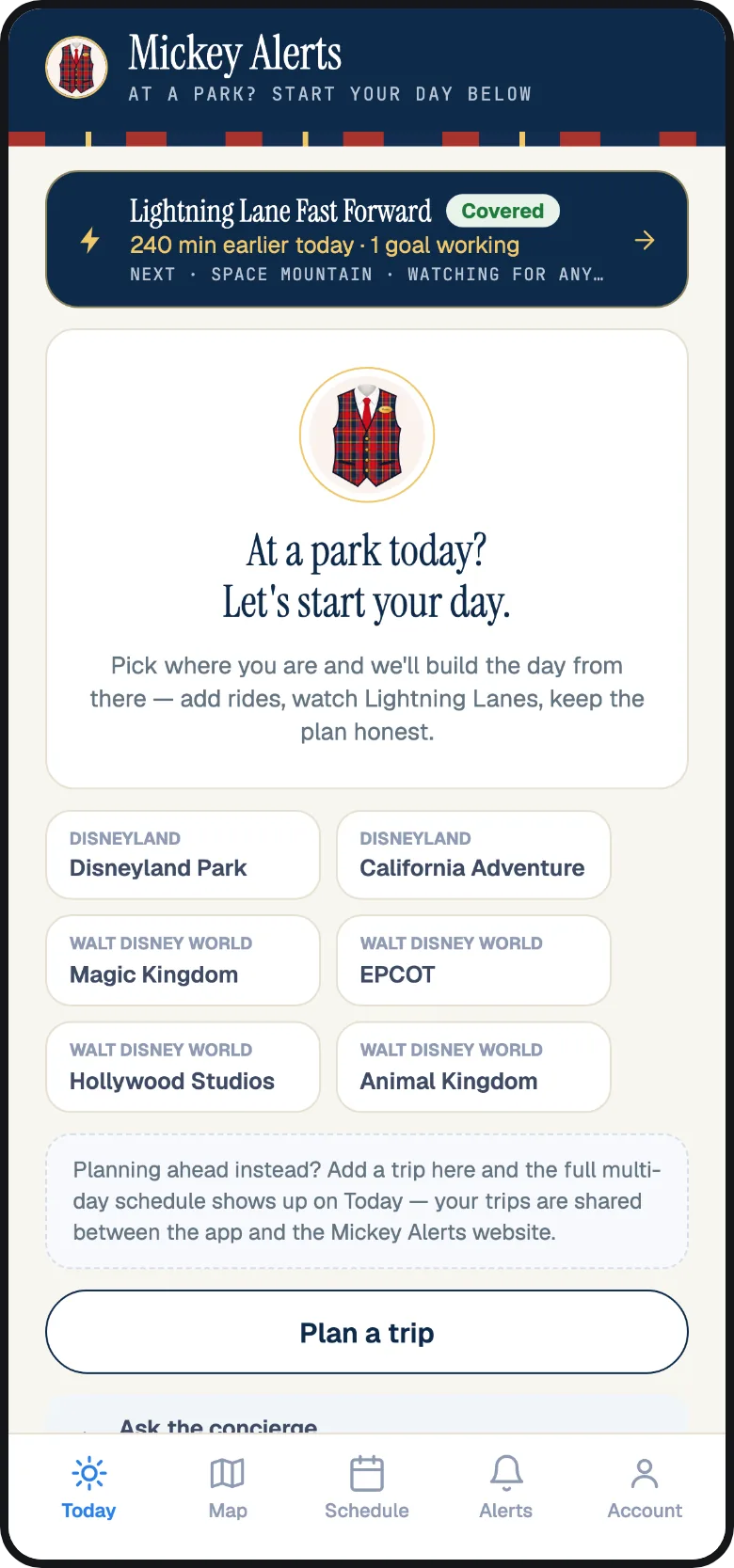
In the Mickey Alerts app, Fast Forward is the navy Lightning Lane Fast Forward card on the Today tab; tap Open Fast Forward. On the day you are in a park, that card sits at the top of Today. On the website it is Tools, then Fast Forward.
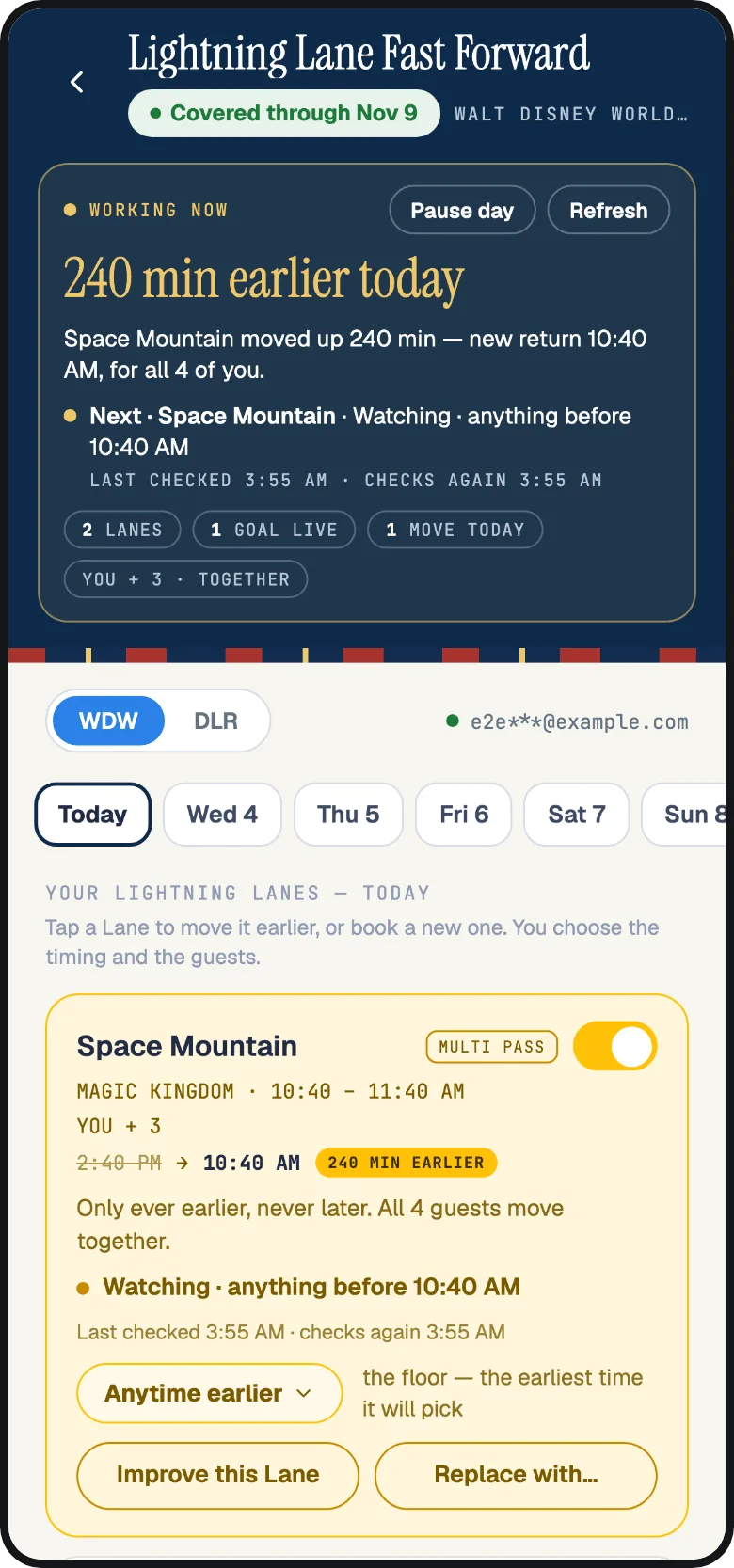
Connect your Disney account for the resort you are visiting. Walt Disney World and Disneyland are separate Disney sign-ins, so each is connected on its own: in the app under Account, then Disney accounts; on the website under Settings, then Disney Account. The top of the Fast Forward screen shows which account is connected, with the email partly hidden and a green dot when the account is connected.
Step 1: pick your rides
Open the park day you want and tap Book a new Lightning Lane. Search for a ride and add it; add as many as you like for that day. Fast Forward works through them in the order you add them. You can change the order any time in the goal list.
Only rides Multi Pass can book appear in the picker. Single Pass rides, the headliners Disney sells separately, are handled differently; see Single Pass rides below.
If you add two or more rides, you can switch on Get whichever comes first. Fast Forward then treats them as alternatives: it books the first one it finds and sets the others aside. It is useful on busy days when you would be happy with either of two headliners.
Step 2: choose when you want it
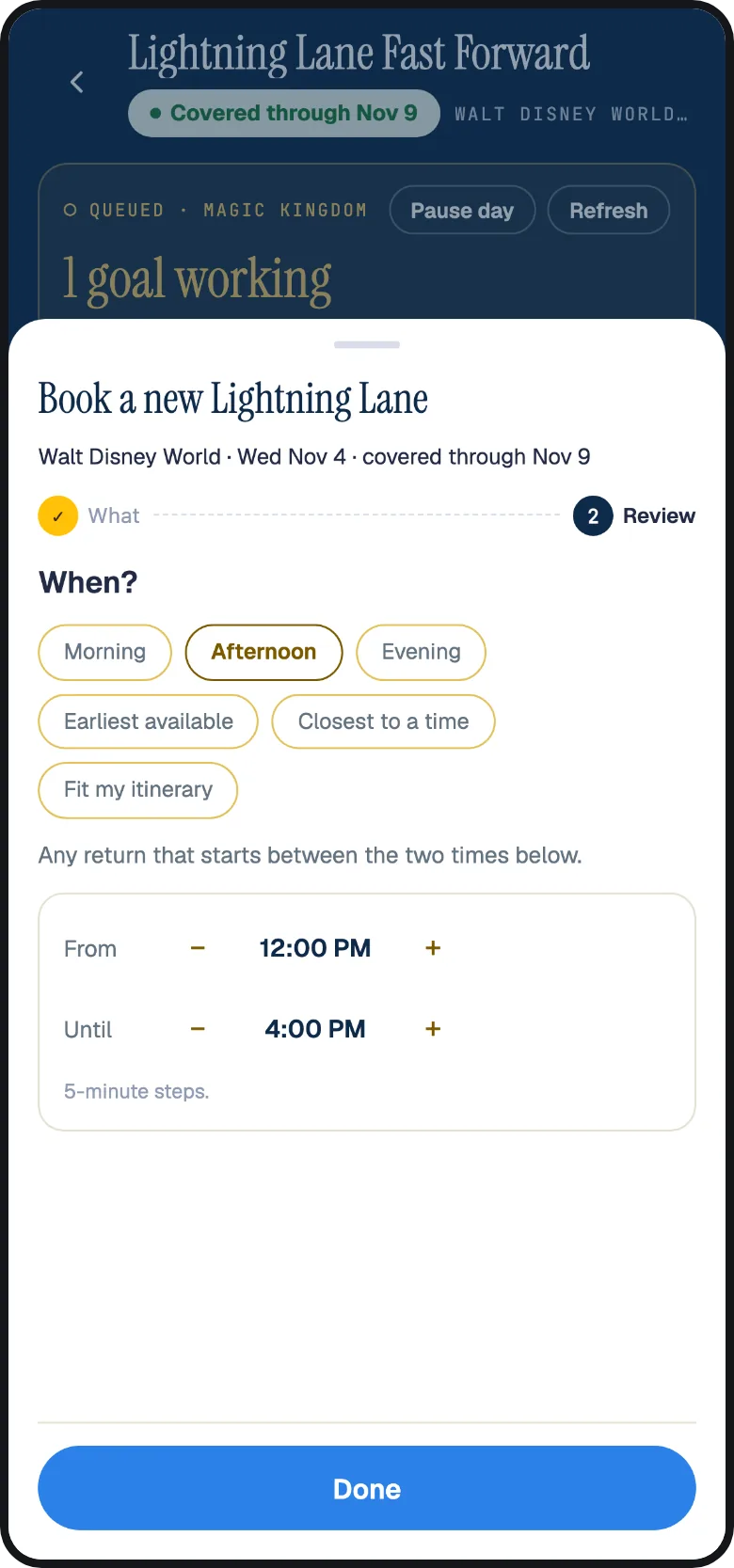
You choose a time for each ride. On one day, you might want a morning ride, an afternoon ride and one as early as possible.
- Morning, Afternoon or Evening fills in a window (9 to 12, 12 to 4, or 4 to 8) that you can adjust in 5-minute steps: Not before and Not after on the website, From and Until in the app. Fast Forward books inside that window and keeps looking for earlier times within it.
- Earliest available takes the earliest return Disney offers, however far out, as long as you can get there in time. When improving a Lightning Lane you already hold, this reads Anytime earlier.
- Within 2 hours takes the first return that starts within the next two hours. If nothing does, Fast Forward keeps watching.
- Closest to a time aims for a specific time inside a window, for example a ride at 2:00 PM between a lunch and a show.
- Fit my itinerary picks the time that leaves your day the most room, around your dining reservations, shows and the rest of your plan.
Fast Forward checks your chosen times against the dining reservations, shows and other bookings on your Disney account. It reads your plans and skips return windows that overlap. You do not need to set anything up for this.
A booking goal also has a switch, Keep improving it after it books. With it on, Fast Forward books the ride and then keeps moving it toward the time you asked for all day. With it off, it books once and leaves the time alone.
Step 3: who is riding
A new booking starts with everyone on your Disney account selected. Uncheck anyone who is sitting this one out. The whole group is booked together on one Lightning Lane, so everyone gets the same return window.
If only some of your party has Lightning Lane Multi Pass for that day, Fast Forward shows you who has it. You can wait for everyone or choose Book who is ready. If you book who is ready, the rest get their own Lightning Lane for the same ride as soon as they add Multi Pass, and the card reads "Booked for 4 of 6" until then.
When you are improving a Lightning Lane you already hold at Walt Disney World, you get more choices: move Just these guests, or Split if needed, which lets two halves of the group take two earlier windows that overlap by at least 30 minutes and start no more than 10 minutes apart. The default is always Keep together.
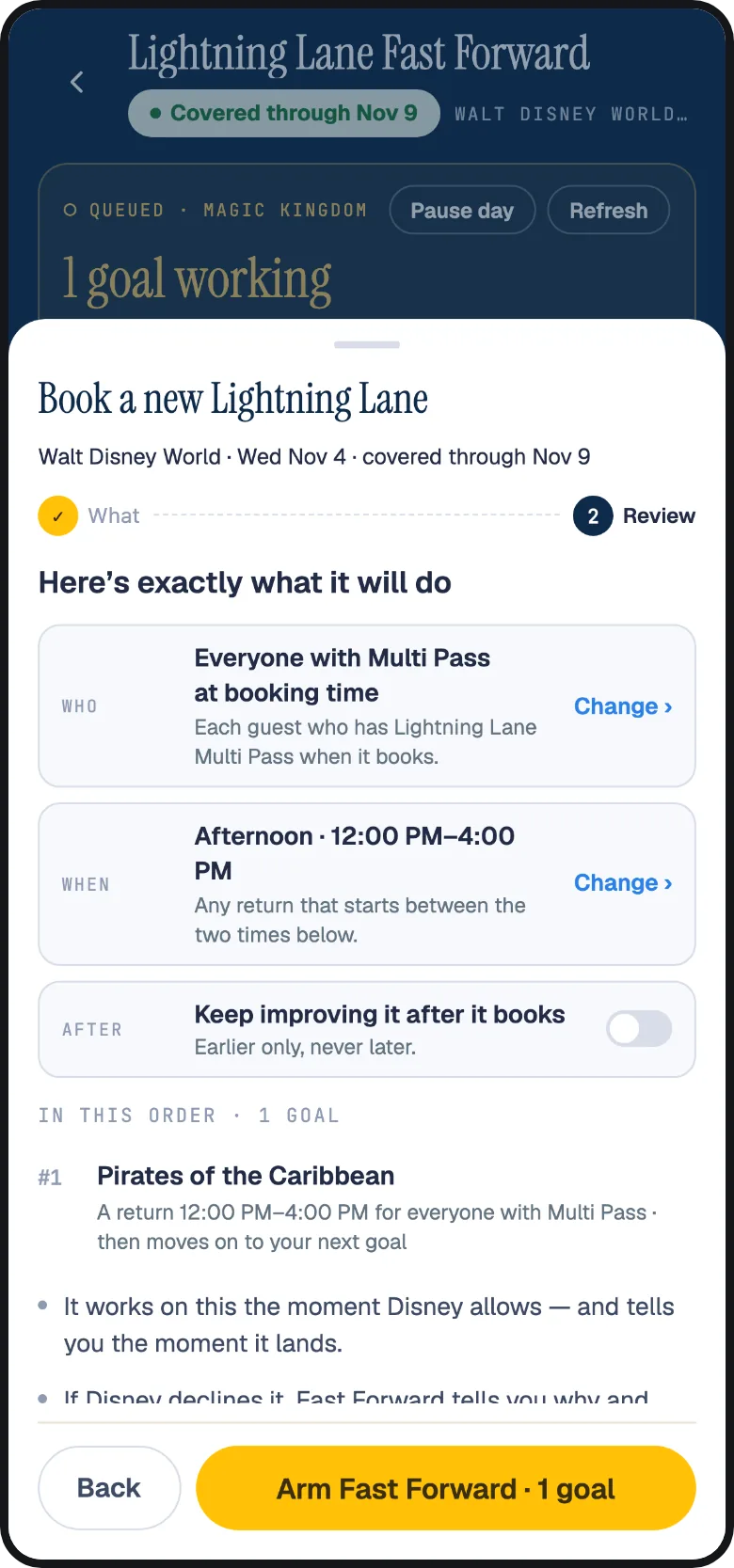
Step 4: review and start Fast Forward
The last step shows your ride, guests and time limits, along with what Fast Forward will do after booking. If your chosen window allows a later return time, you will see that in bold with the exact time limits. Tap Arm Fast Forward to confirm these settings and start.
If Disney turns the request down when Fast Forward tries it, we show you Disney's message word for word.
When Fast Forward books: the booking window
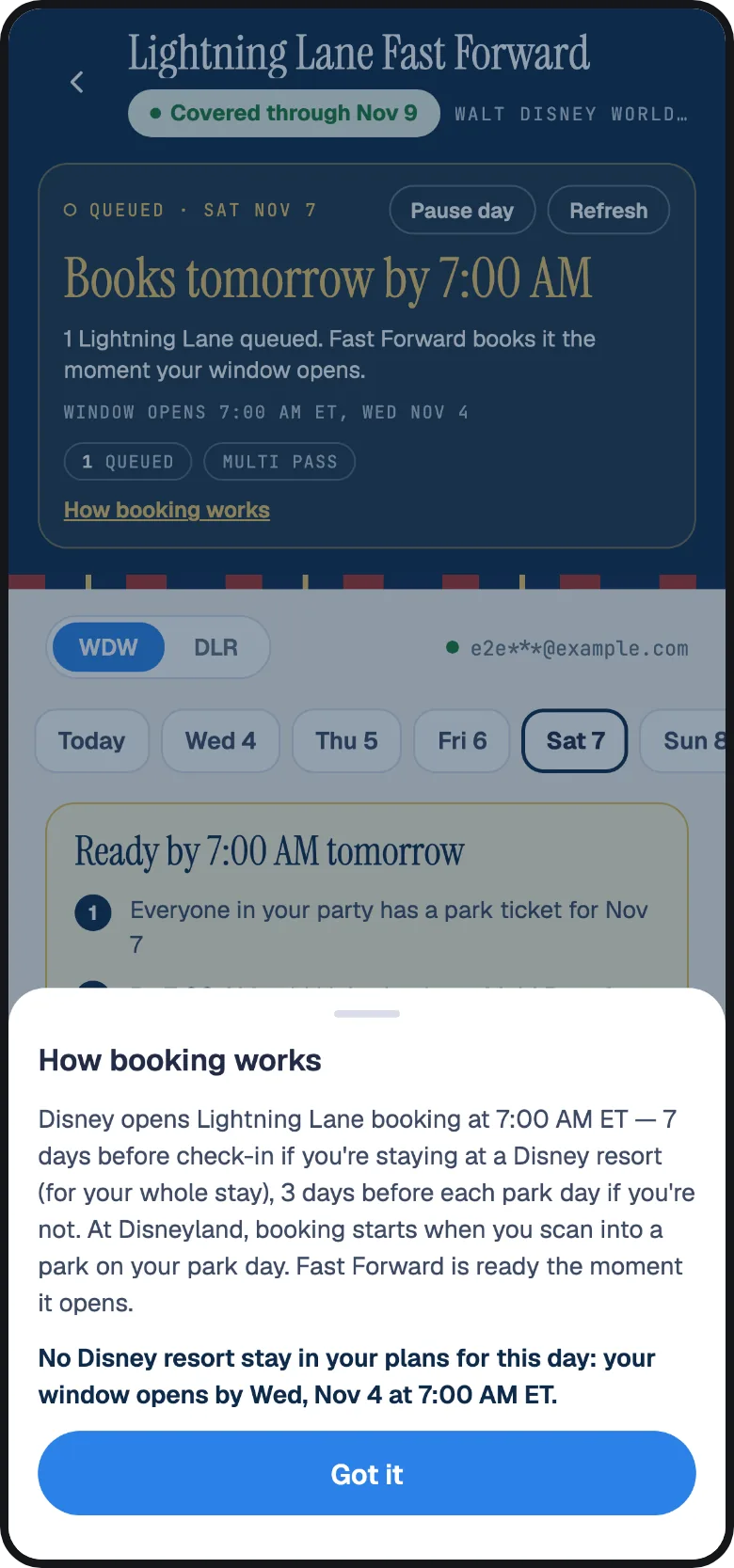
Fast Forward follows Disney's booking windows exactly; it cannot book before Disney allows anyone to. The rules are on the Lightning Lane page; here is how they show up in Fast Forward.
| Your situation | When Fast Forward books | What the screen says |
|---|---|---|
| Disney World, staying at a Disney Resort hotel | 7:00 AM Eastern, 7 days before check-in, for every day of your stay. | "You're staying at Disney's Contemporary Resort: your window opens Thu, Oct 8 at 7:00 AM ET." |
| Disney World, staying elsewhere | 7:00 AM Eastern, 3 days before each park day. If a date-based ticket opens your day earlier, Fast Forward notices and books then. | "No Disney resort stay in your plans for this day: your window opens by Thu, Oct 8 at 7:00 AM ET." |
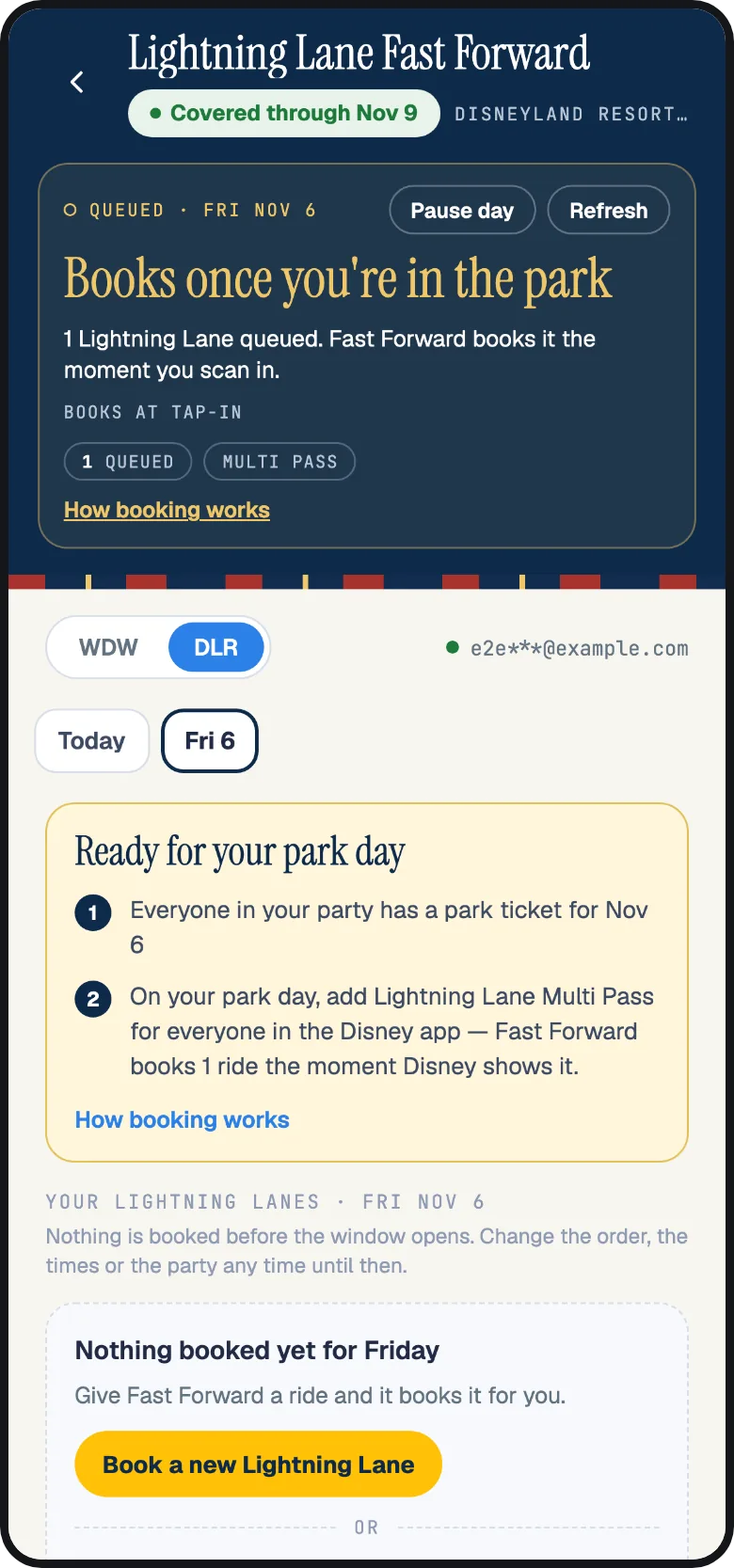
| Disneyland | The moment someone in your party scans into a park on the day. Disney allows no selection before that. | "Books once you're in the park." |
Fast Forward reads your resort stay from the plans on your Disney account, so the hotel window applies automatically when the stay is there. Tap How booking works on the day to see which booking rule applies to your trip.
The day before: getting ready for 7:00 AM
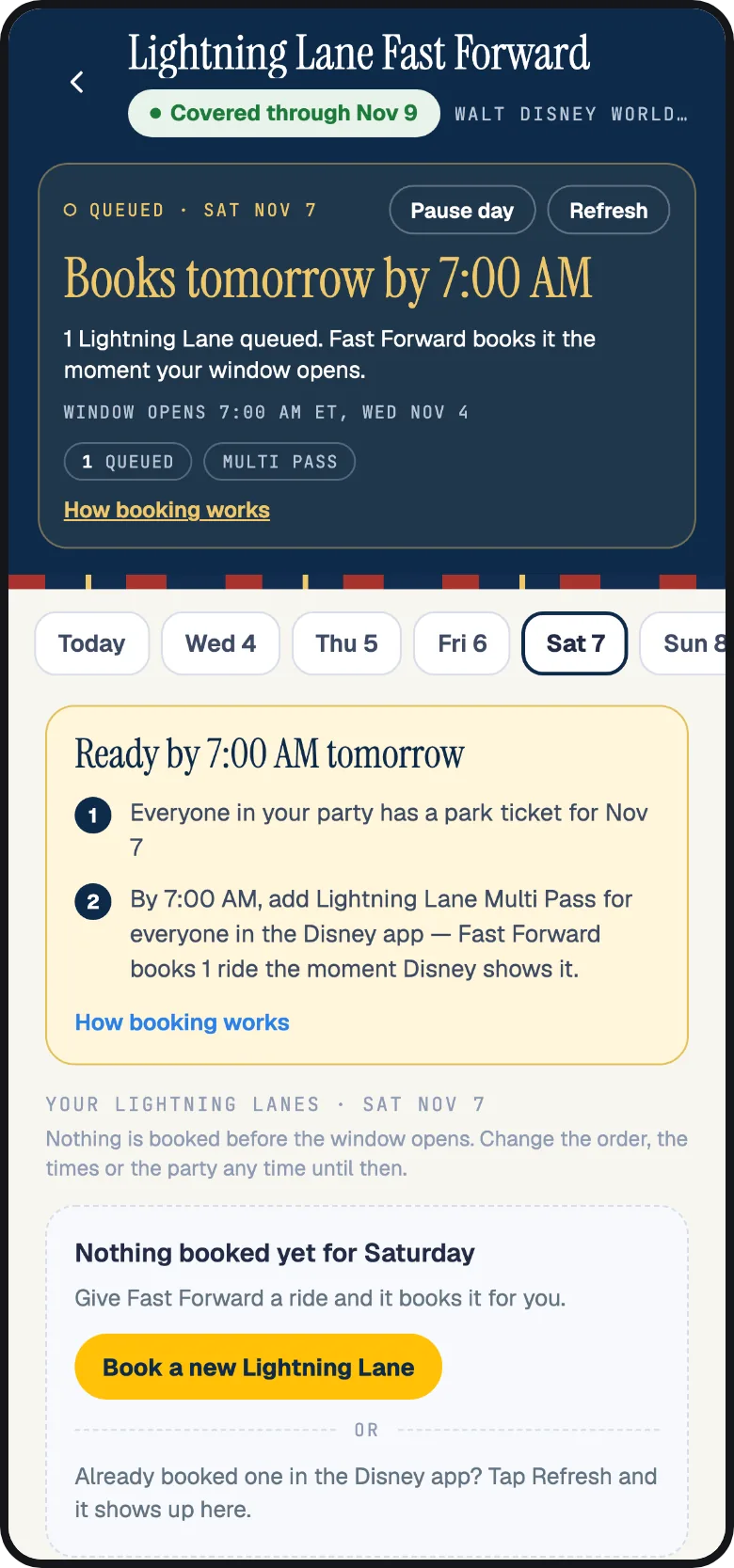
At Walt Disney World the whole day is decided in the first minutes after the window opens, so Fast Forward gets you ready for it. From the day before your window, each park day with rides queued shows a readiness card, Ready for Thursday 7:00 AM, with a short checklist:
- Everyone in your party has a park ticket for that day.
- At 7:00 AM, add Lightning Lane Multi Pass for everyone in the Disney app. Disney sells it only from that moment, and Fast Forward books the moment Disney shows it.
- The day needs to be covered by a Fast Forward pass.
The evening before the window opens, from 6:00 PM Eastern, Fast Forward sends your group one reminder, by push notification or by text when push cannot reach you, saying that booking opens at 7:00 AM and to add Multi Pass in the Disney app as soon as it does.
After the opening, if Disney says some of your party still has no Multi Pass, the card names them, with Open Disney app and I added it. Tapping I added it makes Fast Forward check with Disney again right away; the app also re-checks each time you come back to it.
The opening morning
At 7:00 AM Eastern, Fast Forward asks Disney to book your first ride for everyone with Multi Pass, then the next, in the order of your list, inside the times you chose. You add Multi Pass in the Disney app; Fast Forward sees it within seconds and books. Each ride shows "Booked for 6" or "Booked for 4 of 6" with the return window, and your Disney app shows the same reservations.
Disney's advance rules apply to these bookings, and Fast Forward tells you when one does:
- One park before the trip. Your advance picks for a day all have to be in one park. If your rides are at two parks, the second park's goals read "Disney allows one park before your trip" and wait for the day itself, when the rule lifts after your first tap-in.
- One Tier 1 before the trip. When everyone in your group already holds a Tier 1 ride for that day, a second Tier 1 waits; you get one notice saying so, and Fast Forward keeps trying, including on the day.
- Up to three in advance. Beyond three advance picks, the rest of your list waits for the park day, when using a ride frees the next one.
Once a ride is booked, the rest of your list keeps going, and with Keep improving it after it books on, Fast Forward starts looking for earlier times right away.
Before your trip: moving Lightning Lanes earlier
At Walt Disney World, Fast Forward improves your booked Lightning Lanes in the days before you arrive, not only on the park day. Most of the move to earlier times happens before your trip. Other guests change and cancel their return windows constantly, and Disney releases more in small batches; Fast Forward asks for an earlier time over and over and takes one the moment it appears.
For a Lightning Lane you booked yourself in the Disney app, open its card in Fast Forward and tap Improve this Lane (or switch on Move earlier for the simple version). The card then carries the exact policy sentence, for example "Only ever earlier, never later. All 4 guests move together", and Fast Forward follows those limits.
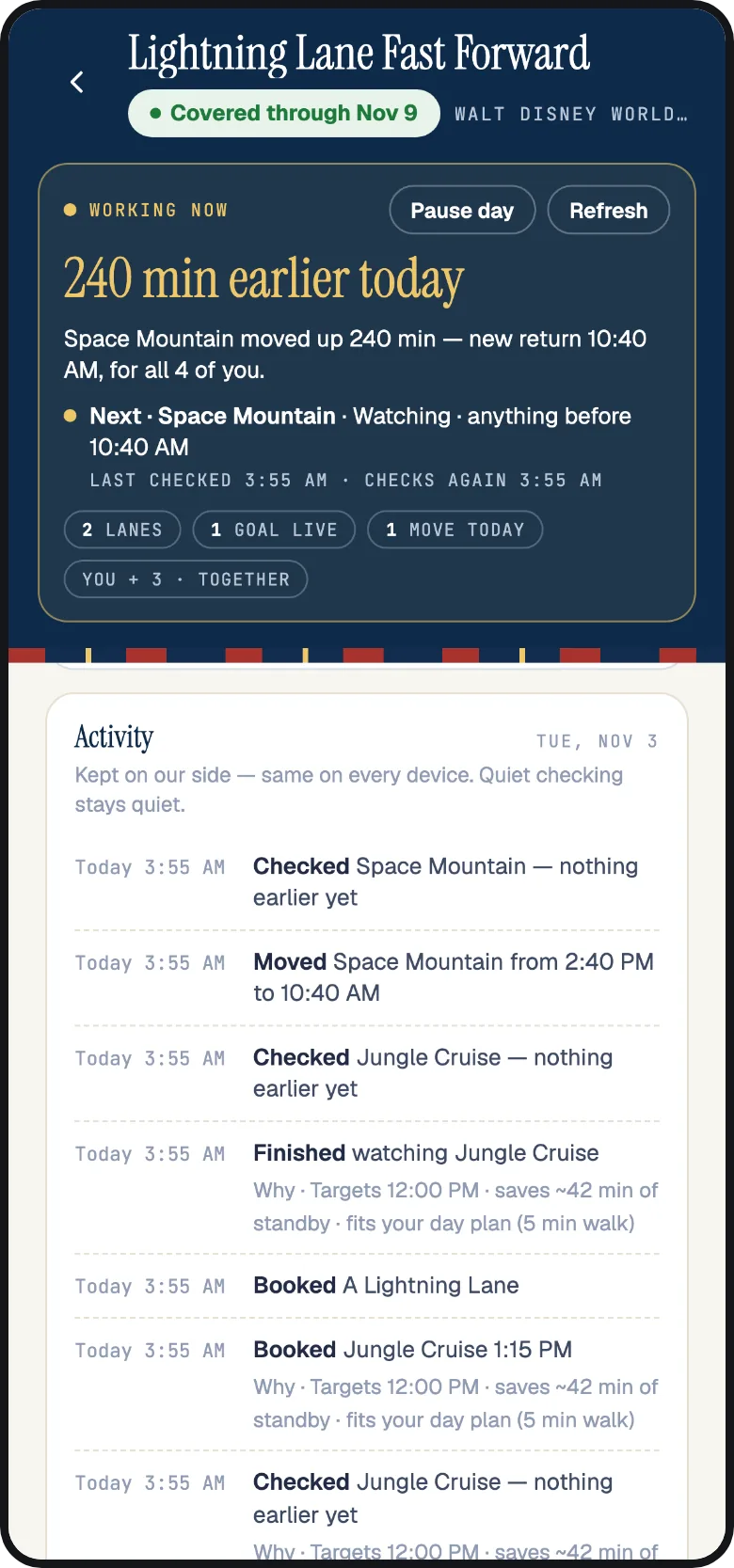
Every move shows in the Fast Forward log with the old time, the new time and the minutes gained, and the day summary adds them up as minutes saved. A move is final only after Disney confirms it and Fast Forward re-reads your plans; until then the card says Verifying.
On the park day
On your park day, Fast Forward checks your goals for that park more often and gives them priority. It handles these three tasks:
- Your booked Lightning Lanes keep moving earlier, exactly as before the trip.
- Each time you tap into a ride, Fast Forward books the next one. Disney lets your group hold only so many Lightning Lanes at once and opens the next pick when you use one. Fast Forward is watching for that moment and books the next ride on your list, usually within seconds of the scan. In the app it also offers this when you check in to a ride from your schedule; the switch reads Auto-stack my Lanes.
- You can add rides all day. Open Fast Forward, tap Book a new Lightning Lane and add the ride. It joins the end of your list, and you can move it up.
Because Disney opens one pick at a time, Fast Forward books your rides one after another, in list order, not all at once. If you want Tower of Terror before Runaway Railway, put it first. The Fast Forward log labels these "booked at tap-in".
Switch on Text me day-of results on the day and Fast Forward also texts you each booking and each move as it happens, so you do not have to open the app in a queue.
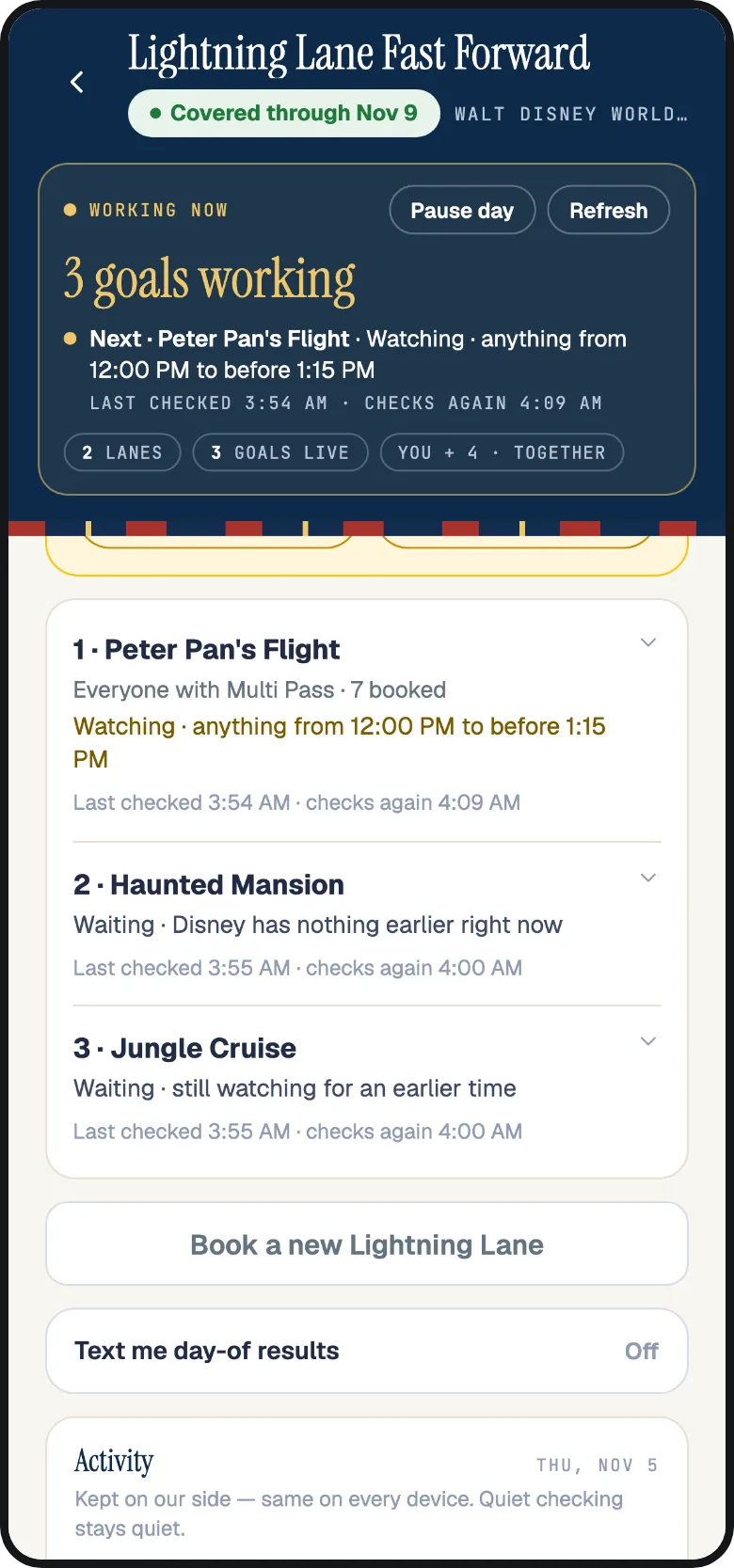
The list: what should Fast Forward get next?
Below your Lightning Lane cards, What should Fast Forward get next? lists everything we are working on for the day. Every active goal has a status line explaining what is happening.
Fast Forward books in list order. A goal behind another reads "Queued #2 · Space Mountain is ahead of this goal". Move a ride up or down with the arrows. Each goal also has Change times, for a ride that has not booked yet, and Stop. A ride and party that already have a goal are not added twice; change the goal you have instead.
Alternatives you grouped with Get whichever comes first show together. When one books, its row says the alternative won. The others follow the settings you chose during setup.
Disneyland days
At Disneyland Resort, Disney allows no Lightning Lane selection until someone in your party has scanned into a park that day, so Fast Forward works differently there. You set up your rides and times in advance just the same, and the day shows "Books once you're in the park". Nothing happens overnight; Fast Forward starts checking at the park's earliest entry time and books the moment Disney lets your party choose.
From then on it is the rolling rule: you hold one pick at a time, and the next one opens when you ride or two hours after booking. Fast Forward books the next ride on your list each time that happens and moves your held Lightning Lane earlier in between. Because each pick lives only a couple of hours, Disneyland moves are shorter than Disney World ones, almost 2 hours earlier per Lightning Lane on average rather than about 3.
Disneyland does not offer swapping one ride for another on an existing Lightning Lane, so Fast Forward does not show Replace with on a Disneyland card. Everything else, booking, moving earlier and booking at tap-in, works the same.
What the status lines mean
Each Lightning Lane card and goal has one status line. The first word tells you what is happening. The rest explains why, using Disney's wording when a Disney rule applies.
| Status | What it means | Example |
|---|---|---|
| Watching | Fast Forward is actively checking with Disney and has a next check scheduled. The amber dot pulses. | "Watching · anything from 10:00 AM to before 2:40 PM" |
| Waiting | Disney's rules do not allow this yet. The line says what it is waiting for. | "Waiting · your party can choose another Multi Pass after 11:32 AM" |
| Queued | Another goal of yours is ahead of it in the list. | "Queued #2 · Space Mountain is ahead of this goal" |
| Working | Fast Forward is asking Disney for this change right now. | "Working · asking Disney for this change now" |
| Verifying | Disney accepted the change; Fast Forward is re-reading your plans to confirm it. | "Verifying · Disney accepted the change; checking your plans" |
| Booked | A new Lightning Lane, with the return window and who it is for. | "Booked for 4 of 6" |
| Paused | Stopped for now, with your current booking untouched. Usually a Disney sign-in that needs reconnecting. | "Paused · Disney account reconnect needed; your current booking is untouched" |
| Needs you | Only you can do the next step. | "Needs you · buy this Single Pass in the Disney app" |
| Needs a pass | The day is not covered by a Fast Forward pass yet. The goal is saved and starts the moment you add one. | "Needs a pass · Fast Forward will start the moment you add a Trip Pass or Day Pass for this day" |
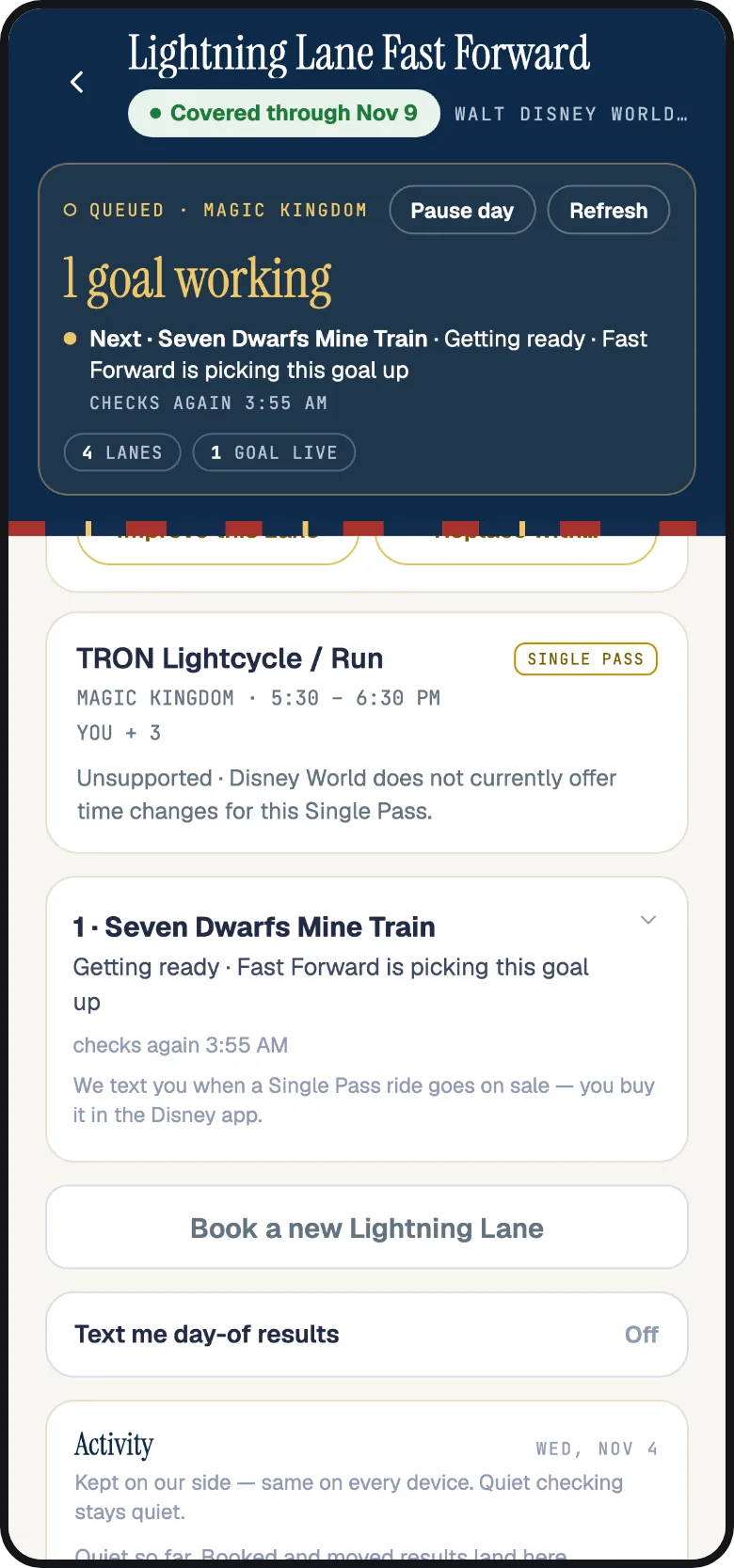
| Unsupported | Disney does not offer this change for this Lightning Lane. | "Unsupported · Disneyland does not currently offer time changes for this Single Pass" |
| Done, Stopped, Replaced, Split | The goal has ended: it finished, you stopped it, a swap replaced its Lightning Lane, or it became two group goals. | "Replaced · this Lightning Lane is no longer the one being watched" |
A live goal always says either when it checks again or what it is waiting for. If you ever see a goal with neither, that is a bug; tell us in chat.
What you can count on
These rules apply to every Lightning Lane you use Fast Forward for. You will also see the ones that apply to your day under Today's promises.
- Return times only move earlier, unless you chose a time window; then they move only inside it, and the goal's row says so in bold.
- It moves only the rides you choose. If you have not turned on Fast Forward for a Lightning Lane, it stays as you booked it.
- You keep your current time until the earlier one is confirmed.
- Your whole party moves together, unless you chose Just these guests or a split.
- Not before the time you set. A Not before time, or a Morning, Afternoon or Evening window, sets the earliest time we can book.
- Your plans stay clear. We skip return windows that overlap a dining reservation, a show or another booking on your Disney account.
- Disney's answers are shown word for word. When Disney turns something down, you read Disney's message, not ours.
- Multi Pass is yours. You add Lightning Lane Multi Pass to your tickets in the Disney app; Fast Forward books with it. Any purchase from Disney happens in the Disney app, by you.
Groups on separate bookings: Move together
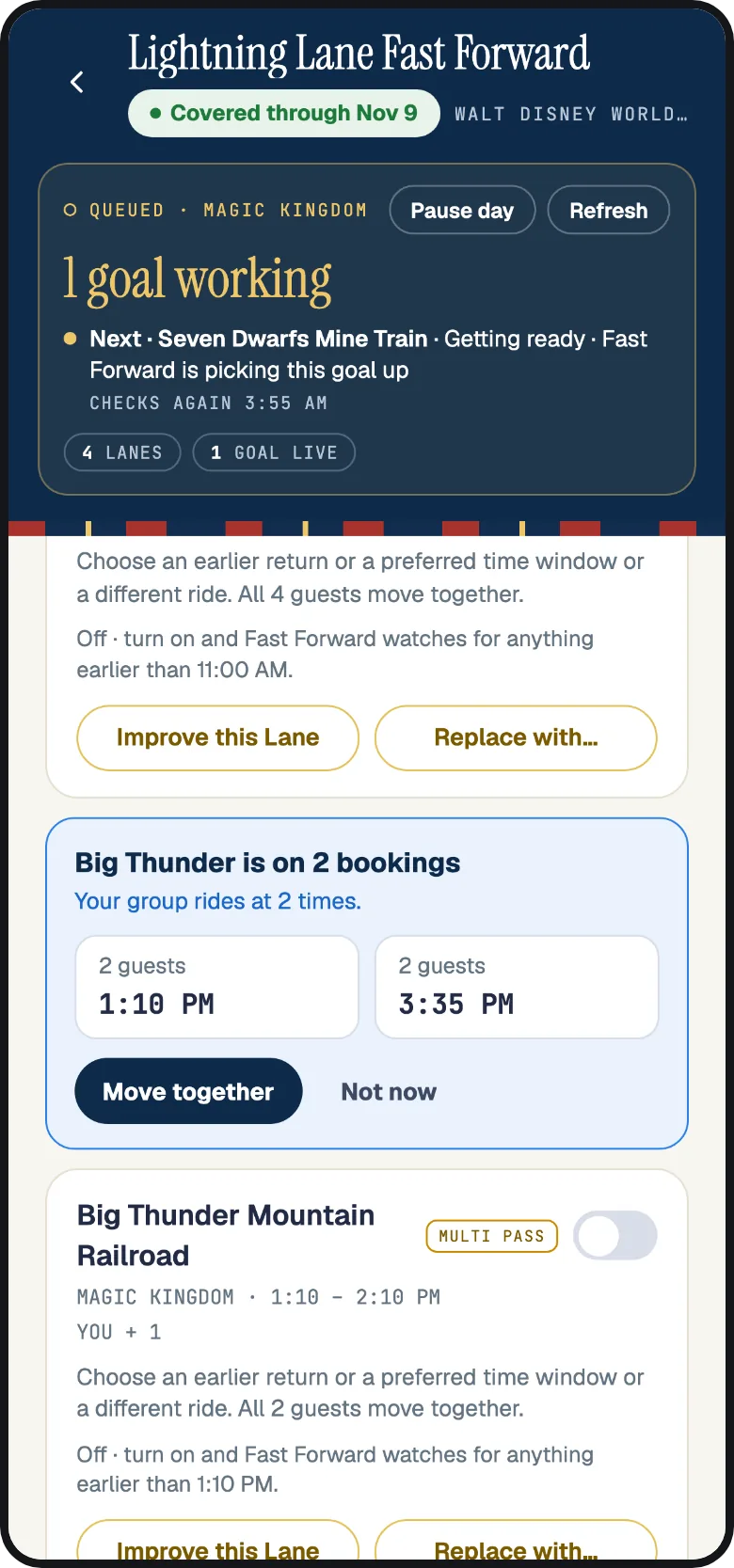
When a group books on different days, for example a family staying on site and friends staying off site, Disney holds the same ride as two separate Lightning Lanes with two return windows. Each one moves on its own, so the times drift apart.
On the park day in Fast Forward, a ride that is on more than one booking shows a note above it, "Big Thunder is on 2 bookings", with a Move together button. Tap it, check the details, and tap Move together again. Fast Forward finds one return time for everyone, no later than the latest group's current time, and combines the bookings into a single Lightning Lane. Everyone keeps their current times until that time is confirmed; from then on the combined Lightning Lane moves earlier as one.
You can also do this yourself in the Disney app: change the time on one booking and select everyone, and Disney combines them. Either way, once the ride is one booking, set Fast Forward up on it and it keeps the group together.
Single Pass rides
Single Pass rides, the headliners Disney sells one at a time, are a purchase from Disney, so they work differently. When you add one in Fast Forward, we text you the moment it goes on sale for your day. You handle the purchase in the Disney app. The goal row reads "We text you when a Single Pass ride goes on sale; you buy it in the Disney app".
Once you hold a Single Pass, its card shows in Fast Forward with a Single Pass badge, and Disney World lets you change its return time in the Disney app until the window starts.
Fast Forward passes
Setting up Fast Forward is free on every Mickey Alerts account: connecting your Disney account, picking rides, choosing times and saving goals. A Fast Forward pass runs your saved goals. A Trip Pass covers every park day in a run of 2 to 14 days at one resort; a Day Pass covers one park day. Club members pay a lower price for both, and the pass is satisfaction guaranteed.
Goals saved on a day with no pass are kept and read "Needs a pass"; they start the moment you add one, so you can save your plans first. On the website, Settings, then Fast Forward passes, lists each pass with what Fast Forward did day by day, for example "3 booked at 7:00 AM Oct 11 · 2 moved earlier", with the receipt and a Request a refund button; a person reads every request.
How Fast Forward keeps you updated
- Push notifications from the Mickey Alerts app for bookings, moves and anything that needs you. Tapping one opens the right day and goal.
- Texts when a push cannot reach you, and for the one reminder the evening before your booking window opens at Walt Disney World.
- Text me day-of results, a switch on the day, texts each booking and each move on the park day itself.
- The Fast Forward log on each day keeps every booking, move and reason, the same on every device.
When something looks off
| You see | What it means | What to do |
|---|---|---|
| "Disney account reconnect needed" | Disney asked for a fresh sign-in. Your Fast Forward goals are paused, and your bookings are untouched. | Tap Reconnect and sign in again; Fast Forward resumes on its own. |
| "Disney allows one park before your trip" | Your advance picks for that day are at another park. | You can wait for the park day, when the rule lifts after your first tap-in. Or move the ride to the park your other picks are in. |
| "Your group's Tier 1 pick for this day is used" | Everyone with Multi Pass already holds a Tier 1 ride for that day. | Fast Forward keeps trying, including on the day. To book it now instead, cancel a Tier 1 booking in the Disney app. |
| "… need Lightning Lane Multi Pass" | Disney says those guests have no Multi Pass for the day. | When they have Multi Pass from the Disney app, tap I added it. You can also tap Book who is ready; the rest join when they have it. |
| "Disney has nothing earlier right now" | Fast Forward asked and Disney had no earlier window at that moment. | Fast Forward keeps checking. Earlier times appear all day as other guests change theirs. |
| "Disney asked for payment, so this one is yours to finish in the Disney app" | The only offer Disney had was a paid one, usually a Single Pass. | You handle the purchase in the Disney app. Once you hold it, Fast Forward looks for earlier times where Disney allows. |
| "Fast Forward is already working on that Lightning Lane" | You tried to add a ride and party that already have a goal. | Open the existing goal and use Change times or Improve this Lane instead. |
| "Booked for 4 of 6" | Two guests had no Multi Pass when the ride booked. | Once they have Multi Pass from the Disney app, a catch-up goal books them onto the same ride as soon as Disney shows it. |
If a day in the app and this page disagree, trust the app: it shows what Disney answered today. If you need help, ask in chat. Plaidy can read your Fast Forward day and change goals for you, and a person can help too.
Questions people ask
Does Fast Forward book new Lightning Lanes, or only move the ones I already have?
Both. Pick the rides you want for a park day and Fast Forward books them when Disney's window opens, then keeps moving them to earlier return times all day. It also looks for earlier times for Lightning Lanes you booked yourself in the Disney app.
Do I need to use the planner or Optimize for Fast Forward to work?
No. Fast Forward runs from the Fast Forward screen alone. The planner and the Today schedule are separate tools; Fast Forward can book and move your Lightning Lanes without them.
Can I add more rides during the park day?
Yes. Open Fast Forward, tap Book a new Lightning Lane and add the ride. Disney opens one pick at a time as you use them, so Fast Forward books your added rides one after another in list order. Put the one you want most at the top.
Can a Lightning Lane end up later than it is now?
Only if you chose a time window that allows a later return. You must first confirm that setting after seeing it in bold on the review page or the goal's row. With Earliest available or Move earlier, times only move earlier.
Does Fast Forward buy Multi Pass for me?
You add Lightning Lane Multi Pass to your tickets in the Disney app, at the opening at Walt Disney World or on the day at Disneyland. Fast Forward sees it within seconds and books with it. Any purchase from Disney is made by you, in the Disney app.
Will it book over my dining reservation?
No. Fast Forward reads the dining reservations, shows and other bookings on your Disney account and refuses a return window that overlaps one. There is nothing to attach or set up for that.
Why does the Disney app show the same change?
Because it is the same reservation. Fast Forward works on the Lightning Lanes on your own Disney account, so every booking and every move appears in the Disney app the moment Disney confirms it.
Can Plaidy or support set up Fast Forward for me?
Yes, on your own account. In chat, Plaidy can set up a ride, arm a held Lightning Lane, change a goal's ride, people or times, and pause, resume or stop it; anything that books or changes a time shows a card you confirm first. Support can pause goals for you. Everything either one does appears on the Fast Forward screen, which stays the full set of controls.
Keep reading: How Lightning Lane works at Disney World and Disneyland. Something on this page is wrong or missing? Tell us in chat and a person reads it.