
Today we're announcing Lightning Lane Fast Forward. You tell it which rides you want on each park day and when you want them, it books your Lightning Lane Multi Pass selections on your own Disney account, and then it keeps moving those return times earlier all day as Disney releases them. It works at Walt Disney World, where it also books before your trip, and it is the only Lightning Lane automation that works at Disneyland.
What "3 hours per Lightning Lane" measures
Fast Forward customers save an average of 3 hours per Lightning Lane. That number measures how much earlier a return time moved, not minutes spent in a standby line.
From September 6 through October 12, 2026, customers across both resorts had 100 Lightning Lanes move an average of 2.9 hours earlier (median 2.2 hours). Added up across a guest's park day, that came to 6.9 hours, so about 7 hours per guest, per park day. We measured again through October 21: 159 Lanes, still 2.9 hours earlier on average.
Say a 7:15 PM Space Mountain return ends up at 2:05 PM. That counts as 5 hours and 10 minutes. You still ride Space Mountain, you just ride it in the afternoon with the evening open for something else. These are measured averages, not a promise about how far any one reservation will move.
How it works
Connect your own Disney sign-in to Mickey Alerts. Fast Forward books on that account. Nobody gets added to your My Disney Experience Friends & Family list.
It works with Lightning Lane Multi Pass, which you add to your tickets in the Disney app. Give Fast Forward your rides for each park day in priority order and it books down the list for your whole party.
Each ride can carry a time. Leave it on "as early as possible," or choose Morning (9 AM to 12 PM), Afternoon (12 to 4 PM) or Evening (4 to 8 PM). Set a window in 5-minute steps, like between 1:00 and 3:30 PM, or ask for the time closest to 2:15 PM. If you built the day in our free park planner, choose "fit my park day plan": the planner places Lightning Lanes into specific time slots, and each planned day has an "Auto-book this day's Lightning Lanes" note that turns them into Fast Forward goals in one tap.
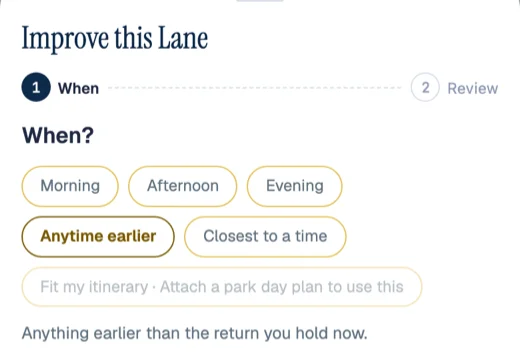
Use "not before" when part of the day is fixed. Set it to 1 PM because you're at lunch, and every booking and every move for that ride stays at or after 1 PM.
Return times only move earlier. The one exception is a window you set yourself, and you confirm that in a sentence before arming. You keep your current time until the earlier one is confirmed, your whole party moves together, and it moves only the rides you chose.
When you tap in at a ride (Disney lets you pick your next Multi Pass selection at tap-in, or 2 hours after booking), Fast Forward books the next ride on your list. Every booking and every move gets a text and an app push, and lands in your activity log with the minutes saved.
You buy Lightning Lane Multi Pass from Disney, in the Disney app, and Fast Forward makes and improves your selections on it. For Lightning Lane Single Pass, we text you when it goes on sale and you buy it in the Disney app.
Disneyland: it starts when you scan in
Disneyland Resort has its own Disney sign-in, separate from Walt Disney World. Connect either or both.
Disney's rule at Disneyland is that nobody can make a Multi Pass selection until they scan into a park that day. After that, one selection at a time. So nothing can book your Disneyland Lanes before you arrive, and we don't claim to.
Fast Forward starts the moment you're in. You plan the day ahead and arm your goals the night before. Once you're through the gate, it books your first selection in your order, watches it for an earlier return time, and books the next one each time you tap in. All day.
The Disneyland number is smaller: 23 Lightning Lanes from September 6 through October 21, an average of 1.8 hours earlier per Lane (median 1.4 hours). The moves are shorter because a Disneyland day works through one rolling selection at a time.
Standby Skipper and Wait Magic both work by joining your My Disney Experience Friends & Family list, and the Disneyland app has no Friends & Family feature. Standby Skipper's own FAQ says it "only supports LLMP within WDW in Florida." Wait Magic describes itself as a service "for Orlando." BG1 removed Lightning Lane booking in November 2025. We looked and found nothing else that books or moves Lightning Lanes at Disneyland. Setup is on the Disneyland Fast Forward page.
Walt Disney World: booked before you leave home
At Walt Disney World, Disney opens Lightning Lane booking at 7:00 AM Eastern: 7 days before check-in for Disney resort guests (covering the whole stay), and 3 days before each park day for everyone else.
Add Multi Pass for everyone in the Disney app, arm your goals, and go to bed. We remind you the evening before your window opens. At 7:00 AM, Fast Forward books down your list the moment Disney shows availability, into the time slots you asked for. Then it keeps looking for earlier return times, in the days before your trip and all day in the park. At Walt Disney World it can also swap a booked Lightning Lane to a different ride.
The Walt Disney World result so far: 136 Lightning Lanes, an average of 3.1 hours earlier per Lane, median 2.75 hours. The Walt Disney World Fast Forward page has the setup details.
How it compares
Standby Skipper and Wait Magic (part of Thrill Data Plus) are the two tools people already know. Standby Skipper books new day-of Multi Pass selections at Walt Disney World, starting at midnight. Wait Magic books new day-of selections and moves booked return times earlier; before the day of your visit it modifies only, with no new bookings at the pre-trip window. Their own sites, as of October 2026:
| Fast Forward | Standby Skipper | Wait Magic (Thrill Data Plus) | |
|---|---|---|---|
| Works at Disneyland | Yes | No, Walt Disney World only | No, Orlando only |
| Books new Lanes at the 7:00 AM pre-trip window | Yes | No, day-of from midnight | No, modifications only |
| Moves booked Lanes earlier | Yes | No ("we don't (and can't) modify booked LLs") | Yes |
| Account access | Your own Disney sign-in | Friends & Family invite | Friends & Family "agent" account |
| Refunds | On request within 30 days of your trip | Non-refundable | Mostly non-refundable |
In fairness, Standby Skipper has a free tier for 8 low-demand rides, and Thrill Data has the deepest public wait-time dataset there is. Standby Skipper is $25 a day or $45 for 7 days; Wait Magic comes with Thrill Data Plus at $30 for 7 days. Longer comparisons: Fast Forward vs Standby Skipper and Fast Forward vs Thrill Data.
In the park with the app
The Mickey Alerts app is free on iPhone and Android. Buy your pass on the website; everything else runs in the app. Here is how we'd run a day.
Start the night before. At Walt Disney World that means before the 7:00 AM window; at Disneyland, before you scan in. Open "What should Fast Forward get next?" and put your must-do rides at the top. The order is the order it books, so if Big Thunder is the one ride your kids care about, it goes first. Use the up and down controls to reorder, check who each ride books for, and arm.
Give a time window only to rides you want in a particular part of the day, and leave the rest on "as early as possible." Around lunch or a show, tap the floor chip on that Lane (it starts at "Anytime earlier") and set a "not before" time in 15-minute steps.
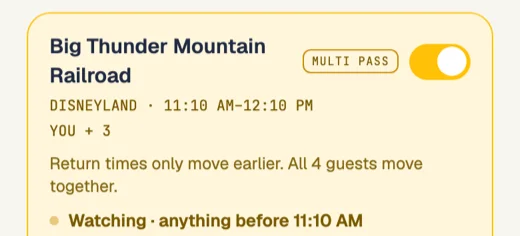
In the park, Today shows your plan and the Fast Forward card. Each Lane shows its return time, and what Fast Forward is watching for ("anything before 11:10 AM"). If you'd rather pick a time yourself, open "See times Disney offers now," choose a slot and tap Apply, or keep what you have.
Keep notifications on and let it run. When a Lane moves earlier, a gold "moved earlier" card slides in with the old and new times, and you get a text. You'll find out from the text, not by refreshing.
After you tap in and ride, check in from the app. That tells Fast Forward to book the next Lane on your list, and the "What now?" sheet suggests your strongest next move from where you're standing, using live waits, your return times and walking distance.
If the day slips, open "Running behind?" and tick off what already happened. The rest of the day re-plans around the real time. At the end of the day, the recap shows every Lane Fast Forward booked or moved, old time to new time, with the minutes. Our Lightning Lane strategy guide covers which rides to put first.
A Trip Pass is $69 and covers every park day of one trip; a Day Pass is $25 (Club members pay $29 and $10). Setting up goals is free, and they start when you add a pass. If it didn't work for you, ask within 30 days of your trip and we refund the pass. Start on the Lightning Lane Fast Forward page.